Monday, 13 December 2010

x-Factor web pages are "advanced" says Google's reading level

Google has rolled out a new search option that assigns a reading level to the pages in your results list. Don't be surprised if you haven't spotted it yet; it is hidden on the advanced search screen. Under the "Need more tools?" section you can choose from the drop down menu to see all of the results with reading level annotations, basic results, intermediate results or advanced results.


Google does not give much away as to how it calculates the reading level and it has nothing to do with the reading age that publishers assign to books. It could involve sentence structure, grammar, the length of sentences on a web page, the length of the document, the terminology used and doubtless many other criteria. But Google isn't saying.

If you have opted to see the annotations, at the top of your results page you will see a graphic showing the percentages for each of the categories. Under the title of each entry in your results list is the reading level.


Click on the Basic, Intermediate or Advanced links next to the bar chart to see pages for that reading level. The eagle-eyed amongst you will have spotted that Google appears to be mathematically challenged because the numbers do not add up to 100%. In all of the searches I have done so far 1 or 2% are missing from the statistics. Looking through the lists of results some pages have no reading level assigned to them and they seem to be documents that contain very little information, have more numbers than text, and some are formatted files. Note, though, that most file formats do have a reading level so why some are not picked up remains a mystery to me. Some Daily Mail articles do not have a reading level either but many would argue that they fall into the 'very little information' category!

Once you have used the Reading Level in the advanced search screen you can change your search on the results page and it remains as part of your search strategy until you close down your browser or tab.

You can also check out an entire web by using the site command, for example site:rba.co.uk


And this is where you can start to have some fun comparing sites (WARNING - this is addictive!). Phil Bradley has done some in his blog posting Google adds reading level
(http://philbradley.typepad.com/phil_bradleys_weblog/2010/12/google-adds-reading-level.html). He also highlights some potential problems with labelling pages in this way. For example 'basic' does not necessarily mean stupid, but some people may be deterred from selecting basic pages because of the tag.

Most of my pages are classed as intermediate and I am happy with that. Many of them are listings and analyses of business information sources. My husband's blog on the other hand is 71% advanced and 27% intermediate. This comes as no surprise to me as he has a habit of littering his postings with complex calculations on topics such as wind turbine energy generation and the EROEI of tar sands oil production. (Just the sort of thing not to read before you have had your second cup of coffee of the day.) That plus the industry specific jargon that he uses makes an advanced tag inevitable.


The evidence so far seems to be suggesting that using terms or jargon that are relatively uncommon in the whole of the Google database is a heavy factor in determining the reading level. Let's look at what one might consider to be an intellectually challenging topic: the use of zeolites in environmental remediation.


That seems to confirm it.

As a final test and for a bit of fun let's look at what Google makes of a search on the recent x Factor final.


Noooooo! Surely some mistake? The X factor home page is rated as basic but 93% of the results are advanced. There is indeed a mistake but it was my sloppy search strategy. Changing the x factor part of the search to a phrase gives what I would expect and a switch to 53% basic, 40% intermediate and 6% advanced.
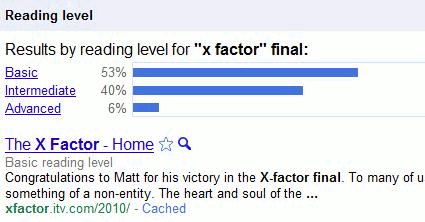

Out of curiosity, I looked at the content of the advanced pages and am now totally bemused. I cannot see how they could ever have been classified as such, but then this is Google we're talking about. Perhaps Google cannot comprehend the scoring system, why so many people watch it or why the programme exists at all?


I have experimented with several other searches. Some came up with results as bizarre as those for the x Factor search but it is interesting how the breakdown can be changed by slightly modifying your search strategy, for example by using phrases when appropriate or a plus sign before a term to force an exact match search. Google's Reading Level could be useful as a training tool to show how small alterations to a search strategy can radically change the results. But as with all things Google, we do not know how it works and the results can sometimes be very strange. Use with caution.


Sunday, 12 December 2010

Cost of True Love's christmas gifts increases by 9.2% according to PNC

PNC Wealth Management's annual  review of their Christmas Price Index (CPI) has revealed that this year True Love will have to pay USD 23,439 for his gifts, an increase of USD 1,974 on last year's prices.

The CPI was started in 1984 and surveys the cost of the gifts given by True Love in the song "Twelve days of Christmas". In 1984 the cost was USD 12,673.56.

James Dunigan, managing executive of investments for PNC Wealth Management said:
"This year's jump in the PNC CPI can be attributed to rising gold commodity prices, represented by the Five Gold Rings which went up by 30 percent, in addition to higher costs for wages and benefits impacting some entertainers"

PNC goes on to say:
"The PNC CPI's surge is in marked contrast to the [US] government's CPI, which grew a mere 1.1 percent, illustrating the difference in size of the two baskets of goods and services."

Whilst the milkmaid's minimum wage did not increase "the prices for birds flew higher in this year's index, in part due to the costs of feed as well as the availability and demand for certain feathered friends that amplified several prices. The Two Turtle Doves increased 78.6 percent to $100 and the Three French hens surged 233 percent to $150. The Partridge in a Pear Tree is up 1.3 percent to $161. But the partridge alone was up 20 percent to $12 and the pear tree is identical to a year ago at $149."

The full tab for True Love who gifts all of the 364 items according to the song's verses is USD 96,824. Shopping on the internet only makes matters worse. True Love will have to pay USD 34,336 compared with USD 23,439 for just one purchase of the items - USD 11,000 more than this year's traditional index:
"In general, Internet prices are higher than their non-Internet counterparts because of shipping costs for birds and the convenience factor of shopping online" Dunigan said.

But that is mere pennies compared to the items that True Love has to buy in an updated version of the song composed and presented by the Scottish Falsetto Sock Puppet Theatre (The 12 Days Of Christmas - Scottish Falsetto Sock Puppet Theatre - YouTube
https://youtu.be/uPMDoKpgKGA)

This is a difficult calculation to make as there are regional differences, for example house prices. Also, what car is True Love prepared to buy? A rock bottom of the market second hand banger or a Lamborghini? How much would assorted bling cost, assuming that True Love did not aim a brick at a jeweller's windows? And it's probably best not to enquire too deeply as to how much the lap dancers or a knighthood would cost. Nevertheless, after lengthy discussions with colleagues, who wish to remain anonymous, we have come up with the cost of the modern True Love's Christmas:

One gifting of the items listed in the 'Socks' video: GBP 258,132 or USD 407,920

Gifting of all the items according to all of the verses: GBP 1,055,646 or  USD 1,668,214

Wednesday, 8 December 2010

My Online Information 2010 presentations

If you have not already spotted the links on Twitter, Facebook, LinkedIn etc  to the various presentations I gave at "Online" in London earlier this month here they are all in one place. I gave two talks as part of the free seminar programme that was part of the exhibition, a conference presentation and a pre-conference workshop. They all have a Creative Commons attribution non-commercial license assigned to them  (see http://creativecommons.org/licenses/by-nc/3.0/ for further information on the license).

Google's New Search Features: has it gone too far?
1st December 2010

This presentation was given in the exhibition area as part of the free seminar and masterclass programme. I have added comments to some of the screen shots so that they make a little more sense to those who were not there.

Challenges of Finding Quality Business Information
1st December 2010

A second presentation I gave as part of the exhibition free seminar programme. Again, I have annotated some of the screen shots.


Search Engine Wars: let battle commence
30th November 2010

This is a presentation I gave as part of the Online Information conference. It is quite different from the one I gave  with the same title to INFORUM in Prague earlier this year. I wish I could say it was because so much has changed since then: unfortunately very little has changed.


Guide to Using Social Media to Promote Your Organisation and Services
29th November 2010

This was a one day workshop pre-conference workshop. The slides merely formed a framework for the day.  There were more services and issues discussed within the group than are shown in the presentation.  The link given below, which is a direct link to a ppt file on the RBA Information Services web site, will not be available indefinitely.  The presentations on my social media page are updated every time I run a workshop or give a seminar on the topic.
PowerPoint Presentation (9.5 MB)

Saturday, 4 December 2010

Facebook trying to take over our browsers?

I have just logged on to Facebook and saw at the top of the page the following:


So Facebook now wants to take over our browsers. When I want to see what my Facebook friends are doing I will decide how and when to do it - not Facebook. Needless to say I have not done as it suggests. 15 minutes later... The above screen shot was taken from within Firefox. Neither Chrome nor Opera displayed the message when I logged in to Facebook. IE8, though, makes it quite clear that Facebook wants to make itself your home page when you start up your browser:


 I did wonder why the Firefox message is not so explicit. I initially thought that it might be an add-on, but dragging something to your home button is, obviously, going to make it your home page. I have a sacrificial laptop in the corner of the office; I shall experiment tomorrow morning unless someone alerts me before then about dire, irreversible consequences.

UPDATE 5th December 2010 7.17 am:  (Yes, I know I shouldn't be awake at such an ungodly hour on a Sunday- blame the cat!).  Just tested the Facebook home page button and it does seem to just make your Facebook page your  browser's home page. It is easily undone. An interesting move, though, by Facebook to encourage users to go straight to Facebook when they wake up. Don't many of them do that anyway?

Monday, 22 November 2010

Removing information about yourself from Google

A question that I am often asked during my workshops is how can one persuade Google to remove a page or information from the web. Sometimes the person wants personal photos or videos to be removed or they are asking on behalf of a company who wants less than flattering comments and opinions deleted. In most cases Google does not control the content put up on web sites or social media, it merely indexes it. So the short answer is that you cannot make Google remove information you do not like except in very specific circumstances, for example copyrighted material on YouTube, images of you or your house on Street View.

"Removing Your Personal Information From Google"
http://searchengineland.com/removing-your-personal-information-from-google-55014 is an excellent overview from Search Engine Land of how you should go about having sensitive information removed (if possible) and dealing with negative publicity. Your first move is to contact the web site owner yourself but unless the information is libellous, breaches copyright or data protection laws you might not have much luck. Suing the web site owner is an option but you could end up generating even more bad publicity for you and your organisation. Swamping out the negative information with your own positive responses is by far the best approach and one that requires you to know how to use social media.

The oft cited example of  how not to tackle bad publicity is that of Nestle. (Just Google Nestle social media fail or Nestle social media disaster.) "Nestle fails at social media - Attempts to censor Facebook" from TechEye http://www.techeye.net/internet/nestle-fails-at-social-media is a neat summary of the events. There are also umpteen Slideshare presentations on how Nestle "did it wrong". Many people have forgotten or never knew what the original argument was about, but after the social media debacle the perception of Nestle as corporate bad boys was reinforced.

The Search Engine Land posting has links to other articles offering sound advice on the topic including:

The Real Lesson In the Yelp User Review Lawsuit
http://www.ninebyblue.com/blog/social-media/the-real-lesson-in-the-yelp-user-review-lawsuit/

and

Official Google Webmaster Central Blog: Managing your reputation through search results
http://googlewebmastercentral.blogspot.com/2009/10/managing-your-reputation-through-search.html (I love the bit ".. don't assume that just because your mom doesn't read your blog, she'll never see that post about the new tattoo you're hiding from her.")

Friday, 19 November 2010

Workshop: social media strategies

I am running a pre-Online Information conference workshop about social media strategies on Monday, 29th November 2010 at the Olympia Conference Centre, London -  "The real-life guide to using social media to promote your organisation and services".

In essence it will cover:
  • how the major search tools are incorporating social media and real time information in their search results and how you can use this to increase awareness of your organisation and its services
  • the importance of identifying relevant platforms and applications for your organisation and tailoring content for them
  • ways in which you can generate and re-use content to reach more potential users
  • engaging with existing and potential customers and users
  • how you can monitor the effectiveness of social media
  • technical and human resource issues and the skills needed to implement a social media strategy
Further details are at Online Information 2010, http://www.online-information.co.uk/online2010/conference/conference-programme/workshop_presentation.html?presentation_id=1266

If you wish to book a place but are not attending the conference you need to click on the "Book Conference Place" link. Fill in the your details on the first page and on the next you can select the workshop only option.

If you have already booked a conference place then you need to call Jo Letts (Joanna.letts@incisivemediacom and +44 (0) 207 316 9361).

Prices are  £195 + VAT if you are attending the conference and for the workshop only £399 + VAT

Monday, 15 November 2010

Google previews web pages in results

Google are offering previews of web pages in your results. People have been reporting this feature for many days now but today is the first time I've seen it in action. Run your search as normal and next to each result in your list you should see a magnifying glass. Click on it and Google gives you a preview of the page with the areas containing your text outlined and the text in boxes superimposed on top of the preview. Although it is a useful tool for assessing the relevance of a page I do find it irritating that Google then automatically previews every result as I move my mouse around the results page. You have to click on the magnifying glass again to switch it off.
