Thursday, 29 December 2016

Seasonal opening times - never trust Google's answers (or Bing's)

This is my usual Christmas/New Year reminder to never trust Google's answers (or Bing's) on opening times of shops over the holiday season, especially if you are thinking of visiting small, local, independent shops.

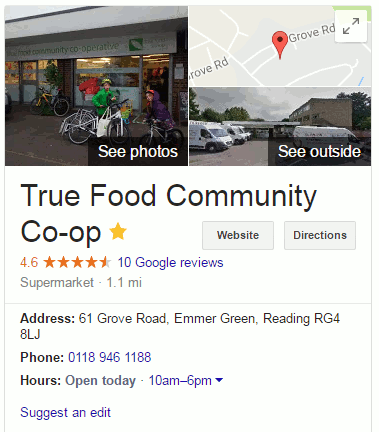
I was contemplating going to our True Food Co-operative but suspected that it might still be shut. A search on my laptop for True Food Emmer Green opening times gave me a link to their website at the top of the results list. On the right hand side was a knowledge graph with information on the shop, it's opening times and reviews that had been compiled from a variety of sources . For most of it the source of the information is not given.  On my mobile and tablet it is the knowledge graph that appears at the top of the results list and  takes up the first couple of screens.


It claims that the shop is "Open today 10am-6pm" [today is Thursday, 29th December].

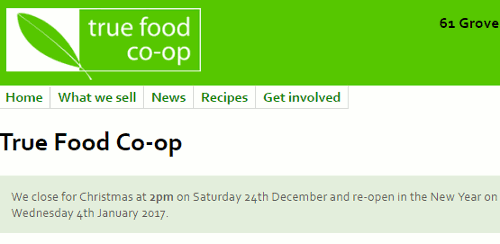
When I go to True Food's website it clearly states near the top of the home page that they are currently closed and re-opening on 4th January 2017.


Google gets it wrong again in the knowledge graph but so does Bing. So, always check the shop's own website, and if you are searching on your mobile or tablet please make the effort to scroll down a couple of screens to get to links to more reliable information.

Tuesday, 15 November 2016

How to write totally misleading headlines for social media

Or how to seriously annoy intelligent people by telling deliberate lies.

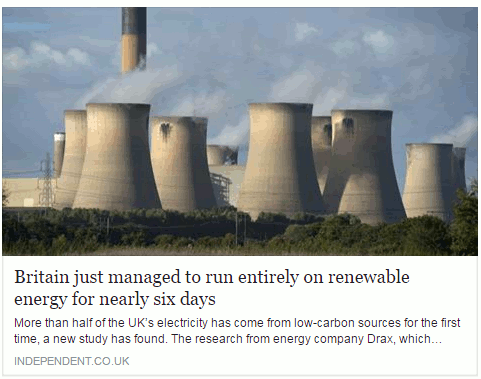
A story about renewable energy has been doing the rounds within my social media circles,  and especially on FaceBook. It is an article from The Independent newspaper that has been eagerly shared by those with an interest in the subject.  The headline reads "Britain just managed to run entirely on renewable energy for six days".

This is what it looks like on FaceBook:

britain_entriely_run_renewable_energy_1

My first thought was that, obviously, this was complete nonsense. Had all of the petrol and diesel powered cars in Britain been miraculously converted to electric and hundreds of charging points installed overnight? I think that we would have noticed, or perhaps I am living in a parallel universe where such things have not yet happened.  So I assumed that the writer of the article, or the sub-editor,  had done what some journalists are prone to do, which is to use the terms energy and electricity interchangeably. Even if they meant "electricity"  I still found the claim that all of our electricity had been generated from renewable sources for six days difficult to believe.

Look below the  headline and you will see that the first sentence says "More than half of the UK’s electricity has come from low-carbon sources for the first time, a new study has found." That is more like it. Rather than "run entirely on renewable energy" we now have "half of the UK's electricity has come from low-carbon sources" [my emphasis in both quotes]. But why does the title make the claim when straightaway the text tells a different story? And low carbon sources are not necessarily renewable, for example nuclear. As I keep telling people on my workshops, always click through to the original article and read it before you start sharing with your friends.

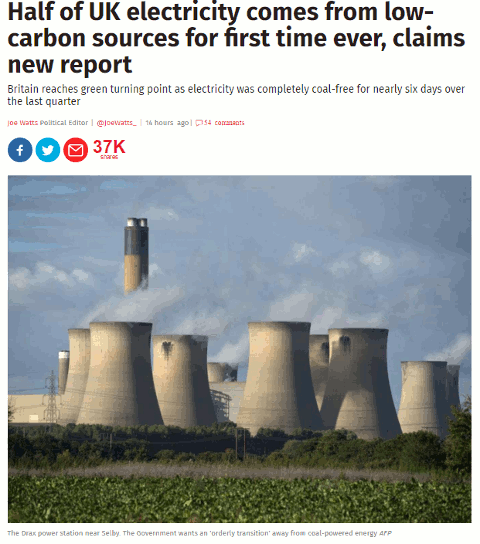
The title on the source article is very different from the facebook version as is the subtitle.

britain_entriely_run_renewable_energy_2
We now have the title "Half of UK electricity comes from low-carbon sources for first time ever, claims new report", which is possibly more accurate. Note that "renewable" has gone and we have "low carbon sources" instead. Also, the subtitle muddies the waters further by referring to "coal- free".

If you read the article in full it tells you that "electricity from low-emission sources had peaked at 50.2 per cent between July and September" and that happened for nearly six days during the quarter.  So we have half of electricity being generated by "low emission sources" but, again, that does not necessarily equate to renewables. The article does go on to say that the low emission sources included UK nuclear (26 per cent) , imported French nuclear,  biomass, hydro, wind and solar.  Nuclear may be low emission or low carbon but it is not a renewable.

Many of the other newspapers are regurgitating almost identical content that has all the hallmarks of a press release. As usual, hardly any of them give a link to the original report but most do say it is a collaboration between Drax and Imperial College London. If you want to see more details or the full report then you have to head off to your favourite search engine to hunt it down.  It can be found on the Drax Electric Insights webpage. Chunks of the report can be read online (click on Read Reports near the bottom of the homepage) or you can download the whole thing as a PDF. There is also an option on the Electric Insights homepage that enables you to explore the data in more detail.

This just leaves the question as to where the FaceBook version of the headline came from.  I suspected that a separate and very different headline had been specifically written for social media. I tested it by copying the URL and headline of the original article using a Chrome extension and pasted it into FaceBook. Sure enough, the headline automatically changed to the misleading title.

To see exactly what is going on and how, you need to look at the source code of the original article:

britain_entriely_run_renewable_energy_3

Buried in the meta data of page and tagged "og:title" is the headline that is displayed on FaceBook. This is the only place where it appears in the code.  The "og:title" is one of the open graph meta tags that tell FaceBook and other social media platforms what to display when someone shares the content. Thus you can have totally different "headlines" for the web and FaceBook that say completely different things.

Compare "Britain just managed to run entirely on renewable energy for six days" with "Half of UK electricity comes from low-carbon sources for first time ever, claims new report" and you have to admit that the former is more likely to get shared. That is how misinformation spreads. Always, always read articles in full before sharing and, if possible, try and find the original data or report. It is not always easy but we should all have learnt by now that we cannot trust politicians, corporates or the media to give us the facts and tell the full story.

Update: The original press release from DRAX "More than 50% of Britain’s electricity now low carbon according to ground-breaking new report"
Monday, 31 October 2016

WebSearch Academy presentations - edited highlights

Edited highlights from the presentations I gave at the WebSearch Academy on 17th October 2016 at the Olympia Conference Centre, London are now available on SlideShare.  They are also available on authorSTREAM. These are selected slides from the presentations; if you attended the event and would like copies of the full sets please contact me.

The presentations are:

New Dimensions in Search: seeing, hearing viewing (takes you to authorSTREAM). Searching for images, video and audio.

WebSearch Academy: If not Google then what? (takes you to authorSTREAM). Looks at alternatives to Google and some specialist tools.

SlideShare options for both are given below.


Saturday, 22 October 2016

Google results: review stars may not refer to what you think they do

The contract for our domestic electricity supply is ending next month so I am trawling through cost comparison and energy supplier websites to check tariffs for our next contract. (UK readers can skip the rest of this explanatory paragraph). I don't know what the situation is in other countries but in the UK the gas and electricity suppliers are forever inventing a variety of tariffs priced significantly less than their "standard" rates to entice you to sign up. The lower priced tariffs are generally only available for a year, or two years at most. At the end of the contract the customer is usually transferred to the more expensive standard rate unless they actively seek out an alternative. The existing supplier is obliged to inform the customer of the new tariffs that will be on offer but the onus is on the customer to inform the company which tariff, if any, they wish to switch to.  For other suppliers' tariffs the customer has to do their own research.

Price comparison sites are a good starting point to identify potential alternatives but the only way to check that the a tariff meets all of your criteria, of which price may be just one of many, is to go direct to the supplier's website. Today I spent most of the morning drawing up the shortlist.

The next step in my strategy was to look at customer reviews on the comparison websites, social media, discussion boards and to run a Google search on each supplier. The reviews and comments generally spanned several years and while the history of a company's customer service performance can be useful it is the last 12-18 months that are most relevant. This is where limiting the search to more recent information by  using Google's date option comes into play. Having spent an hour or so to get this far, and with my brain beginning to wilt, it was tempting to read just the Google snippets for the reviews; but they can convey the wrong overall impression. Google sometimes creates snippets by pulling together text from two or more sections of a page that may be separated by several paragraphs and which may be about completely different products or topics. Never take the snippet at face value and always click through to the original, full article.

One of the energy providers on my short list is Robin Hood Energy, which is a not-for profit company run by Nottingham City Council and has only recently been made available to customers outside of Nottingham.  Customer reviews are therefore less plentiful than for many of the other utilities. The results from a search on

Robin Hood Energy customer reviews

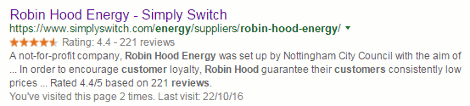
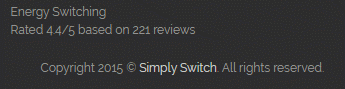
included one from Simply Switch. Underneath the title and URL is a star rating of 4.4 from 221 reviews and one could be forgiven for assuming that this refers to Robin Hood Energy. This is reinforced by the text in the second half of the snippet: "Robin Hood guarantee their customers consistently low prices ... rated 4.4/5 based on 221 reviews".  robin_hood_customer_reviews

The dots are important in that they represent a missing chunk of text between the two pieces of information. When I looked at the web page itself the rating was nowhere to be found in the main body of the text. It was in the footer of the page and referred to the Simply Switch site.

simply_switch_reviews

A reminder, then, to never rely on the snippets for an answer, and always click through and read the whole web page.

Thursday, 6 October 2016

Google Blogger loses links and blog lists: what to do next

Google Blogger has done it again. A major update to the service was rolled out at the end of September and many users woke up to find that the links and blog lists they had so carefully created had gone.   See the Blogger Help Forum for some of the postings and comments on the incident.  Blogger engineers are supposedly working to restore the lost information  but it "may take up to several days." Or never! This is not the first time that blog content has gone missing after an update. A few years ago an update somehow removed the most recent posts from people's blogs. Most of them were eventually recovered but a few disappeared without trace.

The lesson learned from that experience was back up your blog. In Blogger the import and backup tool is under Settings, Other and at the top of the page. Note, though that this will only backup the text of pages, posts and comments. It does not backup any changes you have made to the template, or the content of the gadgets in your sidebars such as links lists and blogrolls. For the  template click on Template in the lefthand sidebar and then on Backup/Restore. This will save the general layout of the gadgets but not the content. For that you will need to copy and save the content for each gadget or save a copy of the content and HTML of your blog.  Back up your Blogger blog: photos, posts, template, and gadgets has details of what you need to do.

And don't forget your photos. For those use Google's Takeout service at https://www.google.com/settings/takeout.

If you don't have a copy of your lists of links then see if you can access an older cached version of your blog  via Google or Bing and save the whole page, or take screen shots. If you try this several days after the event you may be out of luck. Mine were still in the cached page for up to 2 days but have now gone. In Google, use the 'cache:' command, for example:

cache:yourblogname.blogspot.com

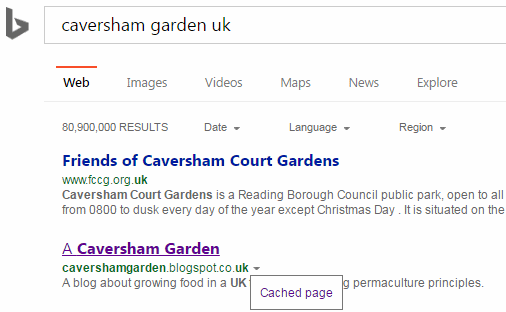
An alternative is to search for your blog and next to your entry in the results lists there should be a small downward pointing green arrow. Click on it and then on the 'Cached' text to view the page.  This works in both Google and Bing  and, again, the sooner you do this the better.

bing_cached_option

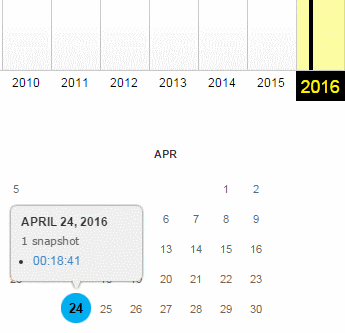
If none of that works then try the Wayback Machine. Type in the URL of your blog and see if they have any snapshots.

wayback_blog

Still no joy? Then either hang around a while longer to see if the Blogger engineers manage to revive your lists or start rebuilding them from scratch. If you haven't looked at them in a while, maybe now is the time to review the content anyway.

Monday, 19 September 2016

Essential Non-Google Search Tools for Researchers - Top Tips

This is the list of Top Tips that delegates attending the UKeiG workshop on 7th September 2016 in London came up with at the end of the training day.  Some of the usual suspects such as the 'site:' command, Carrot Search and Offstats are present but it is good to see Yandex included in the list for the first time.

  1. Carrotsearch http://search.carrotsearch.com/carrot2-webapp/search or http://carrotsearch.com/ and click on the “Live Demo” link on the left hand side of the page.
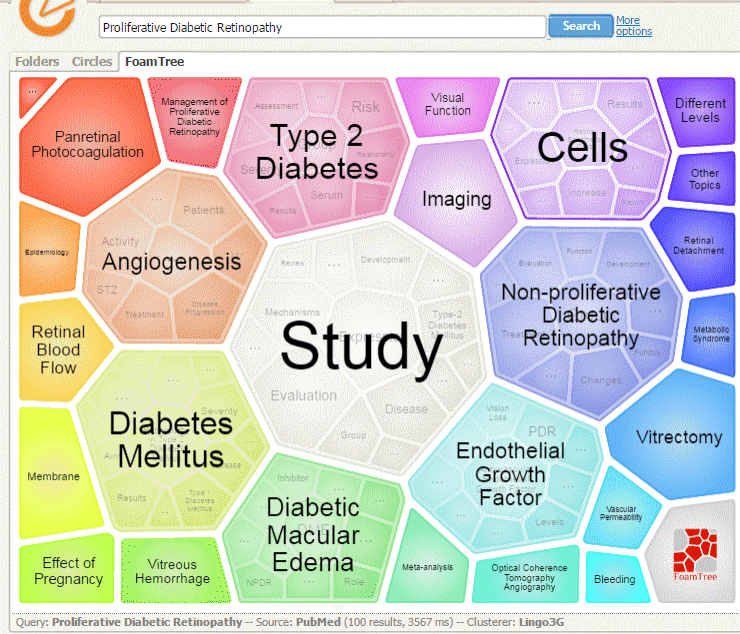
    This was recommended for its clustering of results and also the visualisations of terms and concepts via the circles and “foam tree”. The Web Search uses eTools.ch for the general searches and there is also a PubMed option.

    [caption id="attachment_3731" align="aligncenter" width="400"]Carrot Search Foam PubMed Foam Tree Carrot Search Foam PubMed Foam Tree[/caption]


  1. Advanced Twitter Search http://twitter.com/search-advanced
    The best way to search Twitter! Use the Advanced Search http://twitter.com/search-advanced or the click on the “More Options” on the results page. There is a detailed description of the commands and how they can be used at https://blog.bufferapp.com/twitter-advanced-search 


  1. Yandex http://www.yandex.com/
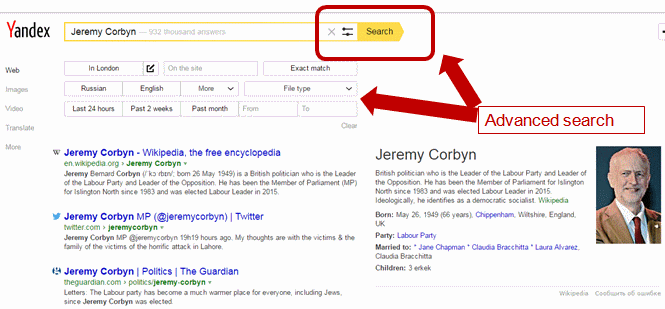
    The international version of the Russian search engine with a collection of advanced commands - including a proximity operator - that makes it a worthy competitor to Google. Run your search and on the results page click on the two line next to search box.

    [caption id="attachment_3734" align="aligncenter" width="400"]Yandex Advanced Search Yandex Advanced Search[/caption]

    Alternatively, use the search operators. Most of them are listed at https://yandex.com/support/search/how-to-search/search-operators.xml. There is also a /n operator that enables you to specify that words/phrases must appear within a certain distance of each other, for example:

    "University of Birmingham" nanotechnology /2 2020

    There are country versions of Yandex for Russia, Ukraine, Belarus, Kazakhstan and Turkey. You will, though, need to know the languages to get the best out of them and apart from Turkey they use a different alphabet.


  1. Millionshort http://millionshort.com/
    If you are fed up with seeing the same results from Google again and again give MillionShort a try. MillionShort enables you to remove the most popular web sites from the results. The page that best answers your question might not be well optimised for search engines or might cover a topic that is so specialised that it never makes it into the top results in Google or Bing.Originally, as its name suggests, it removed the top 1 million but you can change the number that you want omitted. There are filters to the left of the results enabling you to remove or restrict your results to ecommerce sites, sites with or without advertising, live chat sites and location. The sites that have been excluded are listed to the right of the results.


  1. site: command
    Use the site: command to focus your search on particular types of site, for example include site:ac.uk in your search for UK academic websites. Or use it to search inside large rambling sites with useless navigation, for example site:www.gov.uk. You can also use -site: to exclude individual sites or a type of site from your search. All of the major web search engines support the command.


  1. Microsoft Academic Search http://academic.research.microsoft.com/
    An alternative to Google Scholar.“Semantic search provides you with highly relevant search results from continually refreshed and extensive academic content from over 80 million publications.”This was recently revamped and although it now loads and searches faster than it used to the new version has lost the citation and co-author maps that were so useful. It can be a useful way of identifying researchers, publications and citations but do not rely on the information too much. It can get things very wrong indeed. For example, I’ve found that for some reason the affiliation of several authors from the Slovak Technical University in Bratislava is given as the Technical University of Kenya!


  1. Wolfram Alpha https://www.wolframalpha.com/
    This is very different from the typical search engine in that it uses its own curated data. Whether or not you get an answer from it depends on the type of question and how you ask the question. The information is pulled from its own databases and for many results it is almost impossible to identify the original source, although it does provide a possible list of resources. If you want to see what WolframAlpha can do try out the examples and categories that are listed on its home page.


  1. OFFSTATS - The University of Auckland Library http://www.offstats.auckland.ac.nz/
    This is a great starting point for locating official statistical sources by country, region or subject. All of the content in the database is assessed by humans for quality and authority, and is freely available.


  1. Meltwater IceRocket http://www.icerocket.com/
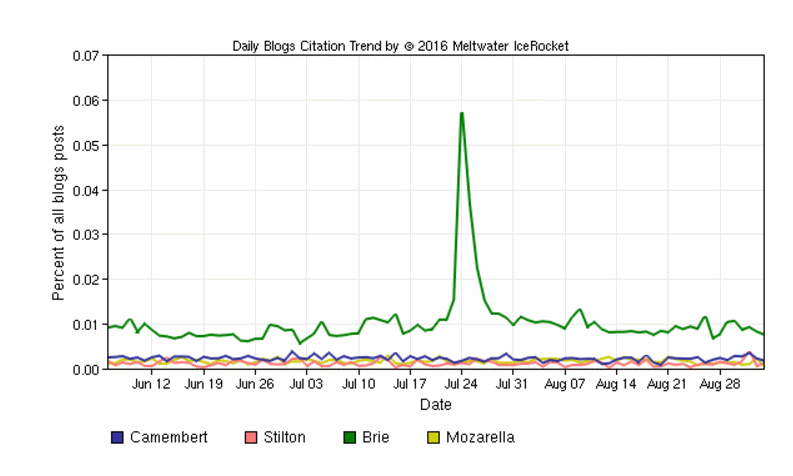
    IceRocket specialises in real-time search and was recommended for inclusion in the Top Tips for its blog search and advanced search options. There is also a Trends tool that shows you the frequency with which terms are mentioned in blogs over time and which enables you to compare several terms on the same graph.

    [caption id="attachment_3739" align="aligncenter" width="400"]IceRocket Trends IceRocket Trends[/caption]

    Very useful for comparing, for example, mentions of products, companies, people in blogs.


  1. Behind the Headlines NHS Choices http://www.nhs.uk/news/Pages/NewsIndex.aspx
    Behind the headlines provides an unbiased and evidence-based analysis of health stories that make the news. It is a good source of information for confirming or debunking the health/medical claims made by general news reporting services, including the BBC. For each “headline” it summarises in plain English the story, where it came from and who did the research, what kind of research it was, results, researcher’s interpretation, conclusions and whether the headline’s claims are justified.

Thursday, 1 September 2016

Don't expect advanced search features to exist forever

A couple of weeks ago I wrote about the problems I was having with Google Verbatim (Google Verbatim on the way out?). This morning I ran through a checklist of commands that I am demonstrating in a webinar and it seems that Verbatim is back working as it should. Don't hold your breath, though. Three times this year I have seen Google Verbatim disappear or do strange things and a couple weeks later return to normal. Verbatim may be here to stay or it may not, but you cannot depend on many advanced search commands to always work as you expect. So either learn different ways of making Google treat your search in the way you require or use a different search engine.

Unfortunately, disappearing or unreliable functionality is not confined to just Google. Bing used to have a very useful proximity command that allowed you to specify how close you wanted your words to be to one another. The "near:n"  operator is still listed in Bing's list of advanced search commands and, although it seems to do something and reduce the number of results, it does not behave as described.

There is also the endangered list such as DuckDuckGo's sort by date option. In fact all of DuckDuckGo's web search options will probably soon change or disappear as it is currently powered by Yahoo! which has been bought by Verizon. Who will DuckDuckGo turn to if Verizon does combine Yahoo with AOL as has been stated in the press?

Get to know several different search tools really well and, for the ones that you use regularly, find out how they work and who provides the search results.