Showing posts with label social media. Show all posts

Tuesday, 15 November 2016

How to write totally misleading headlines for social media

Or how to seriously annoy intelligent people by telling deliberate lies.

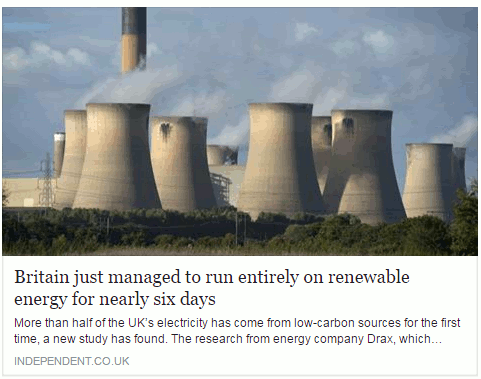
A story about renewable energy has been doing the rounds within my social media circles,  and especially on FaceBook. It is an article from The Independent newspaper that has been eagerly shared by those with an interest in the subject.  The headline reads "Britain just managed to run entirely on renewable energy for six days".

This is what it looks like on FaceBook:
britain_entriely_run_renewable_energy_1

My first thought was that, obviously, this was complete nonsense. Had all of the petrol and diesel powered cars in Britain been miraculously converted to electric and hundreds of charging points installed overnight? I think that we would have noticed, or perhaps I am living in a parallel universe where such things have not yet happened.  So I assumed that the writer of the article, or the sub-editor,  had done what some journalists are prone to do, which is to use the terms energy and electricity interchangeably. Even if they meant "electricity"  I still found the claim that all of our electricity had been generated from renewable sources for six days difficult to believe.

Look below the  headline and you will see that the first sentence says "More than half of the UK’s electricity has come from low-carbon sources for the first time, a new study has found." That is more like it. Rather than "run entirely on renewable energy" we now have "half of the UK's electricity has come from low-carbon sources" [my emphasis in both quotes]. But why does the title make the claim when straightaway the text tells a different story? And low carbon sources are not necessarily renewable, for example nuclear. As I keep telling people on my workshops, always click through to the original article and read it before you start sharing with your friends.

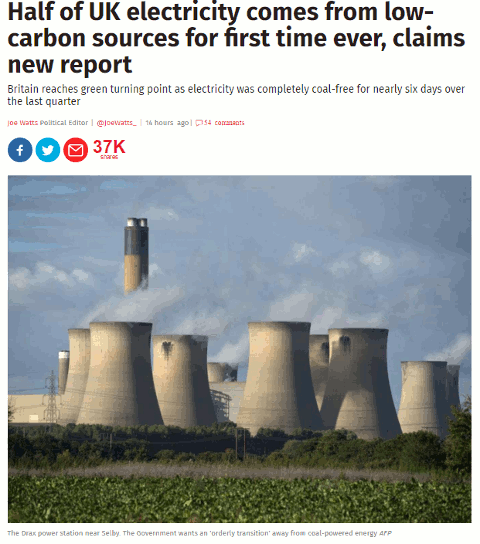
The title on the source article is very different from the facebook version as is the subtitle.
britain_entriely_run_renewable_energy_2
We now have the title "Half of UK electricity comes from low-carbon sources for first time ever, claims new report", which is possibly more accurate. Note that "renewable" has gone and we have "low carbon sources" instead. Also, the subtitle muddies the waters further by referring to "coal- free".

If you read the article in full it tells you that "electricity from low-emission sources had peaked at 50.2 per cent between July and September" and that happened for nearly six days during the quarter.  So we have half of electricity being generated by "low emission sources" but, again, that does not necessarily equate to renewables. The article does go on to say that the low emission sources included UK nuclear (26 per cent) , imported French nuclear,  biomass, hydro, wind and solar.  Nuclear may be low emission or low carbon but it is not a renewable.

Many of the other newspapers are regurgitating almost identical content that has all the hallmarks of a press release. As usual, hardly any of them give a link to the original report but most do say it is a collaboration between Drax and Imperial College London. If you want to see more details or the full report then you have to head off to your favourite search engine to hunt it down.  It can be found on the Drax Electric Insights webpage. Chunks of the report can be read online (click on Read Reports near the bottom of the homepage) or you can download the whole thing as a PDF. There is also an option on the Electric Insights homepage that enables you to explore the data in more detail.

This just leaves the question as to where the FaceBook version of the headline came from.  I suspected that a separate and very different headline had been specifically written for social media. I tested it by copying the URL and headline of the original article using a Chrome extension and pasted it into FaceBook. Sure enough, the headline automatically changed to the misleading title.

To see exactly what is going on and how, you need to look at the source code of the original article:

britain_entriely_run_renewable_energy_3

Buried in the meta data of page and tagged "og:title" is the headline that is displayed on FaceBook. This is the only place where it appears in the code.  The "og:title" is one of the open graph meta tags that tell FaceBook and other social media platforms what to display when someone shares the content. Thus you can have totally different "headlines" for the web and FaceBook that say completely different things.

Compare "Britain just managed to run entirely on renewable energy for six days" with "Half of UK electricity comes from low-carbon sources for first time ever, claims new report" and you have to admit that the former is more likely to get shared. That is how misinformation spreads. Always, always read articles in full before sharing and, if possible, try and find the original data or report. It is not always easy but we should all have learnt by now that we cannot trust politicians, corporates or the media to give us the facts and tell the full story.

Update: The original press release from DRAX "More than 50% of Britain’s electricity now low carbon according to ground-breaking new report"

Sunday, 29 June 2014

How to alienate and seriously annoy your users

LinkedIn is seriously annoying some of its users. Megan Roberts recently reported her experiences of the network's data insecurity on her blog LinkedIn and data insecurity (http://meganjroberts.wordpress.com/2014/06/10/linkedin-and-data-insecurity/). But it seems they've upped their game.

I had (or possibly still do have) a Personal Premium account. As I don't find the limited extra features of any use I decided to cancel my premium account about three weeks ago, well in advance of the renewal date. Having filled out the online forms I assumed that was all I had to do, but each time I logged in to my account it was still marked as a Premium account. So I went through the cancellation process again. I waited a few days but my account was still marked as premium. I went through the cancellation procedure again. My account was still labelled as Premium but when I went to try and cancel it a fourth time it was marked as already cancelled. Success? Well - no.

Today I checked my business bank account and saw that LinkedIn has debited my account for the renewal fee despite my cancellation. Perhaps I should have been alerted to potential problems when confirmation emails failed to arrive. But under my account settings the premium account was finally marked as cancelled so I assumed that was that.

I have raised a ticket with LinkedIn but I doubt I'll get any sense from them - I never have done in the past. First thing in the morning I am reporting the debit to my bank as an unauthorised transaction.
Congratulations, LinkedIn, on developing a strategy that is guaranteed to thoroughly p*** off your users.

Update: LinkedIn have now apologised for the "misunderstanding". My account has been reset to "basic" and they have refunded my money.

Thursday, 20 June 2013

North Wales Libraries Partnership Top Tips


The John Spalding Library in Wrexham hosted the North Wales Libraries Partnership (NWLP) workshop "Search is more than just Google". Delegates from public, government, academic and NHS libraries gathered together to look at the effect of mobile technologies on search, open access, getting better results from Google and alternative search tools.

The consensus reached during one of the breaks was that Cyril, one of the library's residents and pictured on the left, should have ignored Google's nutrition advice and gone for the more authoritative sources available in the library and on the web. If only he had waited and attended the workshop he would have known exactly where to look!

There was much discussion on how mobile devices change how we can search - not always for the best - and there was concern, as usual, over how much we willingly give away about ourselves to services such as Google and Facebook. Open access was debated in the afternoon along with possible directions for academic publishing.


The Top Tips that the group came up with included some of the usual advanced Google commands but others concerned cloud computing and social media. Here they are.

1. Back up your stuff. Having your data hosted in the cloud means you don't have to worry about it disappearing when your laptop or server crashes. But what if your cloud service goes under or your account is deleted for some reason? Have you made a local backup of your essential files and treasured family photos? One of the participants mentioned the Library of Congress digital preservation toolkit for preserving family memories (http://www.digitalpreservation.gov/personalarchiving/).

2. Private browsing for "un-personalising" search results. If you want to make sure that your results are not being influenced by past searches and browsing behaviour, find out where the private browsing option is in your browser (in Chrome it is called Incognito). This ignores all cookies and past search history and is as close as you can get to unfiltered results.

3. Change the order of your search terms to change the order in which results are listed. This is an old trick but still seems to work.

4. Use advanced search commands such as site:, filetype;, intext:, to focus your search. Some of the commands are available not just in Google but also in Bing and DuckDuckGo.

5. Create "newspapers" of articles mentioned on Twitter, Facebook, Google+ or news sites by using services such as Paper.li (http://paper.li/). These can be generated from hashtags, keyword searches or your own Twitterstream. Have a look in the Paper.li news stand to see if someone has already created a paper on your topic. Paper.li automatically compiles the newspaper but there are other services such as Storify (http://storify.com/) and Scoop.it (http://www.scoop.it/) that enable individuals to curate the content that appears in their personal newspaper.

6. Guardian Data Store for datasets and visualisations relating to stories in the news (http://www.guardian.co.uk/data). This was so popular that it was mentioned twice for inclusion in the top tips. What people liked about this is that the source of the data is always given and there are links to the original datasets.

7. Million Short http://millionshort.com/. If you are fed up with seeing the same results from Google again and again give Million Short a try. Million Short runs your search and then removes the most popular web sites from the results. Originally, as its name suggests, it removed the top 1 million but the default has changed to the top 10,000. The page that best answers your question might not be well optimised for search engines or might cover a topic that is so “niche” that it never makes it into the top results in Google or Bing. One person loved it because the type of research they do often pulls up pages of Amazon and eBay results in Google. Not a problem with Million Short

8. Google Reading level to change the type of results that you see. Run your search and from the menu above the results select ‘Search tools’, ‘All results’ and from the drop menu ‘Reading level’. Options for switching between basic, intermediate and advanced reading levels should then appear just above the results. Click on the Advanced option to see results biased towards research.

9. Beware fragmented discussions. Articles can be posted and reposted in many different places: blogs, websites, LinkedIn, Facebook etc. with the result that potentially useful and informative discussions are dotted all over the place. Learn how to locate fragmented discussions in your subject area and where they are likely to occur.

10. Try something other than Google. Take a look at the slides for a few(!) suggestions of what you could use.

Sunday, 24 February 2013

Tweets from the past

Embarrassed by some of your first tweets from 2007? Wish you hadn't got involved in that drunken virtual brawl on Twitter last Christmas? There was a time when you could safely assume that those ramblings would be lost in the mists of Twitter's archive never to be seen again. A search on Twitter would only give the last few days worth of postings and Google no longer archives the whole of Twitter. True, the Library of Congress does keep copies of every single tweet for posterity but access is only allowed for serious research purposes. So far, the Library has received  about  400 inquiries but has not yet been able to provide access (http://blogs.loc.gov/loc/2013/01/update-on-the-twitter-archive-at-the-library-of-congress/). So you can breathe easily again? Unfortunately not.

There are commercial organisations such as Datasift (http://datasift.com/) and Gnip (http://gnip.com/) that charge an arm and a leg for analysing tweets and other social media comments, but the cost puts their services out of the reach of the casual searcher. You may find, though, that your forthright hashtagged tweets at a conference have been recorded for all to see free of charge (Sharing (or Over-Sharing?) at #ILI2012, http://ukwebfocus.wordpress.com/2012/11/02/sharing-or-over-sharing-at-ili2012/). And Twitter, itself, is finally providing access to historical tweets.

You can now download your entire collection. Go to your Twitter home page, click on the cog wheel in the upper right hand corner and select settings.


At the bottom of the Settings page is a link to request your archive. You should receive an email a few minutes later with a download link. The file is zipped and once you have unpacked it you can browse your tweets by year and month or search the archive using keywords or hashtags.


I have not been able to work out how often you are allowed to download your archive and, rather annoyingly, there is no top-up option.

Twitter also runs searches on its entire archive - sort of. There is no obvious date option at the moment, not even under advanced search, so it is appears to be all or nothing, and it does not give you everything straightaway. I thought I would have a look at the tweets on Internet Librarian International 2009, hashtag #ili2009, and was surprised that there seemed to be so few. I scrolled down to the bottom of the results and saw "You’ve reached the end of the Top Tweets for #ili2009" with a link to "View all tweets". Twitter then loaded the remaining tweets as I continued to scroll down the page. About Top Tweets Twitter says:

"We've built an algorithm that finds the Tweets that have caught the attention of other users. Top Tweets will refresh automatically and are surfaced for popularly-retweeted subjects based on this algorithm. We do not hand-select Top Tweets."

There are also links at the top of the results page that enable you to view Top, All, and tweets from just 'People you follow'.


There are in fact advanced search commands that can be used to include a date range in your search (see https://support.twitter.com/articles/71577 for details). Changing my search to #ili2009 since:2009-10-01 until:2009-10-31 did seem to work. I am not convinced, though, that Twitter is giving me everything, even when I choose 'All'. It's a start and long overdue, but I'm not going to abandon my own archiving strategies just yet.

Monday, 30 January 2012

And the next Google killer is....Google!

Many of us have been saying for a while that the search engine that will kill Google is Google itself. It has come so close in the past, two of the more recent incidents being the removal of the plus sign from general web search and stopping the 'ANDing' of search terms. Prefixing search terms with the plus sign enabled searchers to disable Google's synonym and variation search so that it carried out an exact match search. It still works in Google Scholar but not in general web search; Google is now using the '+' prefix within Google+ to help users find Google+ business pages, for example +BASF will quickly take you to the BASF business page.  Google redeemed itself to some extent by hastily bringing in the Verbatim option, which can be found in the left hand menu of your results page. This will run your search exactly as you specify it (Google: Verbatim for exact match search http://www.rba.co.uk/wordpress/2011/11/18/google-verbatim-for-exact-match-search/). However, while it works with Google commands such as 'filetype:' and 'site:' it gives up as soon as you start using some of the options in the left hand menu on the results page, such as date.

And now enter Google+ and Search Plus Your World (SPYW). If you decided to add Google+ to your Google account Google has seriously messed up altered the way it handles your search if you are logged in. It now incorporates and gives priority to results from your Google+ network. (For more details from Google see Search, plus Your World - Inside Search http://insidesearch.blogspot.com/2012/01/search-plus-your-world.html). At present it is only available if you are signed in on Google.com and searching in English. "Search Plus Your World" is now the default and personalizes your results based on both your own behaviour and social connections, and content that has been shared with you through Google+.  Phil Bradley has written an excellent posting on how this works (Why Google Search Plus is a disaster for search http://philbradley.typepad.com/phil_bradleys_weblog/2012/01/why-google-search-plus-is-a-disaster-for-search.htmll).

Initially I was in two minds about SPYW. I thought I might find it useful if I wanted to check what people in my Google circles were saying about a particular issue but then realised that most of them prefer to post on Twitter rather than in Google+ and Google+ does not cover Twitter! The Search+ results include
  • listings from the web
  • pages from the web that have been given priority because of your search behavior
  • pages from the web given priority because of your social connections
  • both public and private (or limited) Google+ posts, photos and Google Picasa photos
When it comes to serious research Search+ includes far too much irrelevant information. So how easy is it to turn it off? If you are logged in when you run your search you will see a message above your results that tells you the number of personal results and "other results” that have been found. There is also a toggle that enables you to switch between personalised and unpersonalised results. You can also switch it off permanently within your search settings.


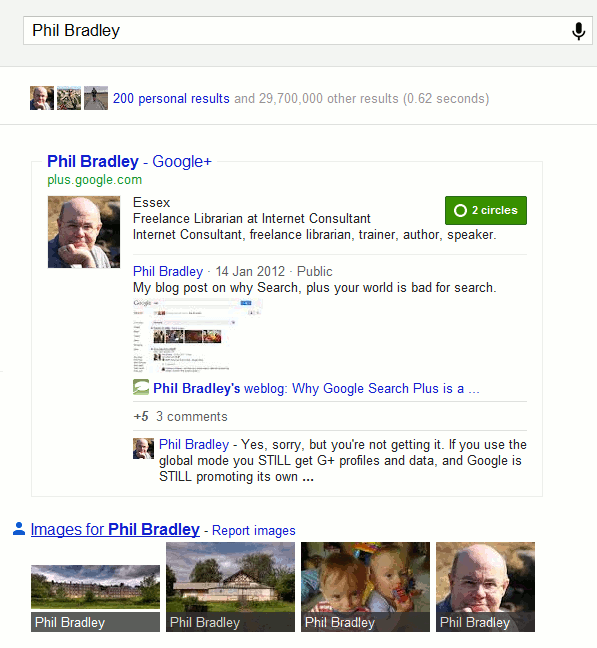
You can of course just log out of your Google account before you run a search, or never sign up for Google+ in the first place. But Google is making the latter increasingly difficult. Let's look at the results that might be popping up on your screen and as an example I'll use a search on Phil Bradley, search and social media expert and President of CILIP. First of all a search on Phil Bradley before Search+ arrived:


On my screen I see pages from his web site, his blog and a Wikipedia entry (which is not the Phil Bradley I am looking for!). When I sign in to a Google account that has Google+ associated with it I see something completely different:


Phil's Google+ profile is given priority above everything else and takes up most of the screen regardless of whether or not it is the most relevant or most up to date (Real-Life Examples Of How Google's "Search Plus" Pushes Google+ Over Relevancy http://searchengineland.com/examples-google-search-plus-drive-facebook-twitter-crazy-107554).  And don't think you can escape with a Google account that does not include Google+. Google has ways of enticing you to "upgrade":


Even worse, if you sign up now for a new Gmail, YouTube or Blogger account you are automatically joined to Google+ (http://searchenginewatch.com/article/2140440/New-Gmail-YouTube-Blogger-Users-Join-Google-by-Default).

Search+ has even tainted the suggestions that pop up as you type in your search:


Phil's Google+ profile is given prominence and if you click on the link without having an account yourself your are invited to join:


To see what the suggestions should look like a group called Focus on the User (http://www.focusontheuser.org/) has produced a bookmarklet for Chrome, Firefox and Safari and extensions for Chrome and Firefox. This tries - and succeeds most of the time - to display your search results without the intrusion of Google+ results. For my search on Phil his Google+ profile is replaced with Twitter.


When I run a search on my own name my Google+ entry is supplanted by my LinkedIn profile.

"What Google should be" does not, though, remove the extra "content" that Search+ sometimes adds to the right of your results. Run a subject search and you may see "People and Pages on Google+" that are supposedly related to your search terms.


I have not yet found these entries to more relevant than standard search results and the link "Learn how you could appear here too" indicates that Google sees this as another way of persuading people and organisations to join Google+. Switching it off is not easy. It is still there if you are logged out of your Google account. It is still there if you add &pws=0 to the search URL (in fact &pws=0 does not seem to work any more at all for depersonalising results). It does disappear, though, if you use Incognito in Chrome. The intrusion of Google+ is most obvious when running searches with just one or two terms or more consumer biased searches. As soon as you start building more complex searches involving filetype: or site: for example, or research more scientific subjects then Google+ takes a back seat.

Search+ is not all that is affecting how Google presents results. Google is simplifying its privacy policies and combining user data from all of its services (Official Google Blog: Updating our privacy policies and terms of service http://googleblog.blogspot.com/2012/01/updating-our-privacy-policies-and-terms.html). It sounds innocent enough but I've already spotted major changes. Google knows I live in Reading because I have told it and I do find that useful when I am carrying out local searches for restaurants, builders etc. Google has now decided, though, to bombard my YouTube home page with videos about Reading.


The videos of the Reading railway station redevelopment are vaguely interesting but I see enough of that in real life on a daily basis when I pass through the centre of town. The football videos are of no interest to me whatsoever. So the crossover of content has already started and I am not looking forward to what Google decides to put in my web search results as a consequence of my YouTube activity!

It is becoming increasingly difficult to make Google behave. Using advanced search commands is one way but many searches do not require them. The best method I have found so far is to use Chrome as your browser and open an incognito window. This depersonalises your results, ignores your web history and existing cookies, and leaves no traces of your search activity. Alternatively, since Google has clearly lost the plot when it comes to search, try another service. The three that I would currently recommend are Bing (http://www.bing.com/), DuckDuckGo (http://duckduckgo.com/) and Blekko (http://blekko.com/).

Friday, 18 February 2011

Google includes your social circle in search

Google has been including search results from your social circle for quite a while. If you are logged in to a Google account it sometimes includes a box either at the bottom or in the middle of your search results page with a couple of "Results from people in your social circle":


Click on the link and it will show you more from your circle.

If you are using Google.com and open up the search options in the side bar to the left of your results there is a "Social" option that will do exactly the same thing.


Want to know who is in your social circle? Head straight to your Google dashboard at http://www.google.com/dashboard and scroll down to Social Circle. This not only tells you which of your social networks Google is using but also lists who.


Any social networks that you have mentioned in, for example, your Blogger profile or your general Google profile such as Twitter will be included as will contacts in Google Reader, Google Buzz, Google Contacts and Picasa. In addition to your direct connections Google also searches the content of secondary connections that are publicly associated with your direct connections. The A-Z reveals all!

Until now the Social option has been kept separate but Google has started integrating all of these results with the rest of  your search starting with Google.com (see Official Google Blog: An update to Google Social Search
http://googleblog.blogspot.com/2011/02/update-to-google-social-search.html). So if you are using Google.com and are logged into your Google account you will now start seeing results automatically from your social circle.


Underneath the social search entry it will say something like "Joe Bloggs shared this on Twitter". Hover over this and it tell you how you are connected.

I frequently use social media to search for information and advice but I much prefer to choose when and how to do it. I do not always want Google unilaterally deciding to add opinions from all and sundry in my network. Remember, this is not just the direct connections that you have chosen to make but others who are connected to them and over which you have no control. The only way you can shut this off completely is to log out of your Google account. I will reserve final judgement until I have used it more but after only 2 hours of experimentation I am already finding that some searches are dominated by results from Twitter, Google Reader and Flickr. The results look even more cluttered than before and I fear it gives Google even more opportunity to completely mess up the search.

Wednesday, 8 December 2010

My Online Information 2010 presentations

If you have not already spotted the links on Twitter, Facebook, LinkedIn etc  to the various presentations I gave at "Online" in London earlier this month here they are all in one place. I gave two talks as part of the free seminar programme that was part of the exhibition, a conference presentation and a pre-conference workshop. They all have a Creative Commons attribution non-commercial license assigned to them  (see http://creativecommons.org/licenses/by-nc/3.0/ for further information on the license).

Google's New Search Features: has it gone too far?
1st December 2010

This presentation was given in the exhibition area as part of the free seminar and masterclass programme. I have added comments to some of the screen shots so that they make a little more sense to those who were not there.

Challenges of Finding Quality Business Information
1st December 2010

A second presentation I gave as part of the exhibition free seminar programme. Again, I have annotated some of the screen shots.


Search Engine Wars: let battle commence
30th November 2010

This is a presentation I gave as part of the Online Information conference. It is quite different from the one I gave  with the same title to INFORUM in Prague earlier this year. I wish I could say it was because so much has changed since then: unfortunately very little has changed.


Guide to Using Social Media to Promote Your Organisation and Services
29th November 2010

This was a one day workshop pre-conference workshop. The slides merely formed a framework for the day.  There were more services and issues discussed within the group than are shown in the presentation.  The link given below, which is a direct link to a ppt file on the RBA Information Services web site, will not be available indefinitely.  The presentations on my social media page are updated every time I run a workshop or give a seminar on the topic.
PowerPoint Presentation (9.5 MB)

Monday, 22 November 2010

Removing information about yourself from Google

A question that I am often asked during my workshops is how can one persuade Google to remove a page or information from the web. Sometimes the person wants personal photos or videos to be removed or they are asking on behalf of a company who wants less than flattering comments and opinions deleted. In most cases Google does not control the content put up on web sites or social media, it merely indexes it. So the short answer is that you cannot make Google remove information you do not like except in very specific circumstances, for example copyrighted material on YouTube, images of you or your house on Street View.

"Removing Your Personal Information From Google"
http://searchengineland.com/removing-your-personal-information-from-google-55014 is an excellent overview from Search Engine Land of how you should go about having sensitive information removed (if possible) and dealing with negative publicity. Your first move is to contact the web site owner yourself but unless the information is libellous, breaches copyright or data protection laws you might not have much luck. Suing the web site owner is an option but you could end up generating even more bad publicity for you and your organisation. Swamping out the negative information with your own positive responses is by far the best approach and one that requires you to know how to use social media.

The oft cited example of  how not to tackle bad publicity is that of Nestle. (Just Google Nestle social media fail or Nestle social media disaster.) "Nestle fails at social media - Attempts to censor Facebook" from TechEye http://www.techeye.net/internet/nestle-fails-at-social-media is a neat summary of the events. There are also umpteen Slideshare presentations on how Nestle "did it wrong". Many people have forgotten or never knew what the original argument was about, but after the social media debacle the perception of Nestle as corporate bad boys was reinforced.

The Search Engine Land posting has links to other articles offering sound advice on the topic including:

The Real Lesson In the Yelp User Review Lawsuit
http://www.ninebyblue.com/blog/social-media/the-real-lesson-in-the-yelp-user-review-lawsuit/

and

Official Google Webmaster Central Blog: Managing your reputation through search results
http://googlewebmastercentral.blogspot.com/2009/10/managing-your-reputation-through-search.html (I love the bit ".. don't assume that just because your mom doesn't read your blog, she'll never see that post about the new tattoo you're hiding from her.")

Friday, 19 November 2010

Workshop: social media strategies

I am running a pre-Online Information conference workshop about social media strategies on Monday, 29th November 2010 at the Olympia Conference Centre, London -  "The real-life guide to using social media to promote your organisation and services".

In essence it will cover:
  • how the major search tools are incorporating social media and real time information in their search results and how you can use this to increase awareness of your organisation and its services
  • the importance of identifying relevant platforms and applications for your organisation and tailoring content for them
  • ways in which you can generate and re-use content to reach more potential users
  • engaging with existing and potential customers and users
  • how you can monitor the effectiveness of social media
  • technical and human resource issues and the skills needed to implement a social media strategy
Further details are at Online Information 2010, http://www.online-information.co.uk/online2010/conference/conference-programme/workshop_presentation.html?presentation_id=1266

If you wish to book a place but are not attending the conference you need to click on the "Book Conference Place" link. Fill in the your details on the first page and on the next you can select the workshop only option.

If you have already booked a conference place then you need to call Jo Letts (Joanna.letts@incisivemediacom and +44 (0) 207 316 9361).

Prices are  £195 + VAT if you are attending the conference and for the workshop only £399 + VAT

Monday, 18 October 2010

Social Media in a Corporate Context

I've just returned from one conference and now about to go off to another. Last week it was Internet Librarian International which looked at  how internet technologies, and social media in particular, are being used  by libraries and information centres as tools for research, to provide better services and support users. It was a well attended and very interactive conference with social media being put to good use to share the event within and outside of the conference. On Friday the hashtag #ili2010 was trending on Twitter in the UK. If you would like to catch up with tweets, presentations, photos etc. the links below should give you a head start:

Twapperkeeper #ili2010 tweet archive  http://www.twapperkeeper.com/
Socialmention http://socialmention.com/ Search on ili2010
Addictomatic http://addictomatic.com/topic/ili2010
Twazzup http://www.twazzup.com/ Search on ili2010
Flickr http://flickr.com/ Search on ili2010

This week's conference is Social Media in a Corporate Context and starts tomorrow (Tuesday, 19th October 2010) in Manchester. Organised by Communicate magazine this event is very different from Internet Librarian in its emphasis and concentrates on corporate communications and reputation monitoring/management:
  • How can you keep your company’s integrity and reputation intact when control is harder to manage?
  • How can you effectively use the information gained from social media evaluation?
  • How do you catch the attention of the tech savvy internet generation?
  • How do you ensure you have the planning, expertise and resource to manage communications during a crisis?
  • How can companies reach out to dispersed employees and keep them engaged?
The full programme and list of speakers is available at http://communicatemagazine.co.uk/events-mainmenu-29/107-smcc/1670-agenda . I am particularly looking forward to Karl Brookes, head of NHS Salford communications and marketing, presenting "The NHS - Reaching disparate audiences: a case study". They may well be using social media to reach their audiences but for most of those working within the NHS social media is usually blocked!

I understand that there are still a few places available so get in quick if you'd like to attend. If you are attending the main part of the conference on Tuesday there is an option to attend a free half day workshop on Wednesday on "Reaching and engaging journalists through social media". Details are at http://communicatemagazine.co.uk/events-mainmenu-29/115-workshop-reaching-journalists-through-social-media

The hashtag for the event is #smcc10

A tweet archive has been set up on Twapperkeeper at http://twapperkeeper.com/hashtag/smcc10 and there is a Lanyrd at http://lanyrd.com/ctbh

Saturday, 16 October 2010

ILI2010 - social search presentation

My presentation on using social media search tools as part of research, which I gave at Internet Librarian International on 15th October 2010, is now available on the sites listed below. I have uploaded it to several different sites and services as I know some of you are not able to access one or more of them at work.
PowerPoint Presentation (6.3 MB) (download from rba.co.uk site)
authorSTREAM
Slideboom
Slideshare

If you want to catch up with #iili2010 tweets there is a Twapperkeeper at http://twapperkeeper.com/hashtag/ili2010

Tuesday, 1 June 2010

Social media in health care libraries - wikis and Netvibes win

I recently ran a version of my social media workshop for a group of health care librarians and information professionals in Liverpool. The group were LIHNN (Library and Information Health Network North West) and HCLU (Health Care Libraries Unit). (For further information about them see their web site at http://www.lihnn.nhs.uk/). I was forewarned that many of them have limited access to social media. Several confirmed that Facebook, Twitter, YouTube and blogs were all blocked in their workplace, yet most of them came from organisations who had set up YouTube channels, Twitter streams and Facebook pages! This raises an interesting question: if they receive a query about, for example, an event listed on their Facebook page or the content of a video on YouTube how are they supposed to respond if they are not able to check the content at the time of the enquiry? I find this mass blocking of social media web sites by organisations totally bizarre and ludicrous. The blocking is not even consistent. Slideshare may be blocked but other presentation sharing sites are often accessible. Add to this the antediluvian technology most of them are forced to use - in particular IE6 - and we end up with organisations that are out of touch with their users and communities, and have no idea what is being discussed or said about them.

But health care librarians and information professionals, and  health care practitioners are an inventive lot. There is plenty of evidence of them having circumvented the barriers put in their way. The excellent Liz Azyan published a series of blog postings on social media and health care just before the workshop took place and they provide plenty of examples and support for those putting together a case for access to social media.

The postings are:
The Liverpool workshop participants were equally innovative. During the practical sessions they were able to test out social media for providing up to date information on their services and current awareness to their users. The winners were wikis for creating mini-websites and Netvibes for presenting RSS feeds and current awareness. The NHS Bolton Library wiki at http://boltonpct.pbworks.com/ and Shrewsbury and Telford Health Libraries Netvibes Team Knowledge Update at http://www.netvibes.com/sathlibraries are just two examples. There was also a great deal of interest in Twitter and blogs for at least monitoring "conversations" on health related topics and their own organisations, and word clouds for analysing the content of documents.

Facebook did not win any converts, nor did Second Life.

My PowerPoint presentation for the day is available in several places, and you should be able to view or download it from at least one of them:

http://www.rba.co.uk/web2/2010HCLUSocialMedia.ppt

http://www.slideshare.net/KarenBlakeman/social-media-for-libraries-health-care-information

http://www.slideboom.com/presentations/169731/Social-Media-for-Libraries-%28Health-Care-Information%29

Monday, 1 March 2010

CLSIG Debate: Web 2.0 - the truth behind the hype

The presentation that I am giving at this evening's CLSIG meeting in Birmingham is now available:
PowerPoint (download from this site - 3.2 MB)
Slideshare
authorSTREAM

I have given the presentation a Creative Commons 3 non-commercial by attribution license, which means you are free to download and re-use it as long you cite me as the author and you don't sell it for a heap of cash!

The other speaker in the debate is Phil Duffy, Information Services Manager at Hammonds LLP.

Thursday, 18 February 2010

Google testing new options interface?

Twitter followers of @daveyp and myself may have spotted a brief exchange of tweets between us and Phil Bradley (http://philbradlel.typepad.com/ Twitter name @philbradley) about additional icons appearing on Google results pages when 'Show  options' was selected. An example of what @daveyp was seeing is at http://www.daveyp.com/blog/stuff/google.jpg . He was using Google.com, the "search provider" box in IE and running IE8.0.6001 on WinXP SP3. It did not matter whether or not he was signed in to a Google account.

Phil Bradley and I attempted to replicate this on our various machines, operating systems, browsers etc but could not and neither could anyone else in @daveyp's twitterstream. Phil Bradley wondered if @daveyp had stumbled upon some unique, bizarre experiment. In the mean time I had turned to the email discussion list of the AIIP (Association of Independent Information Providers), one of my professional networks. One hour and fifteen minutes later, fellow member Donna Fryer responded with a link to http://blogoscoped.com/forum/163640.html, which suggests that Google are testing a change to the format and layout. The posting also refers to http://searchengineland.com/google-streamlines-search-options-30143 . By this time @daveyp had reported that the icons had disappeared and the layout returned to normal!

I subscribe to the Blogscoped RSS feed but had completely forgotten about the posting. In a follow up tweet Phil Bradley echoed my own thoughts when he pointed out that the Blogscoped article was written in November 2009 and asked why they had started testing again now. The answer may be in the Search Engine Land post: "the cleaner display may be launched across Google after the New Year." So keep your eyes peeled for a new layout in Show Options.

As well as alerting me to a potential change in the Google results layout, this whole exchange reinforced to me the power of networks and social media when one is faced with a problem - and I include the good old-fashioned, traditional email discussion lists. One person reports an oddity on their preferred social network (in this case Twitter). Members of that person's network pick it up, investigate and pass it on to members in their preferred networks  (in my case the AIIP discussion list). Suggestions, advice and information are passed back to the original enquirer and problem solved!