Showing posts with label Twitter. Show all posts

Sunday, 24 February 2013

Tweets from the past

Embarrassed by some of your first tweets from 2007? Wish you hadn't got involved in that drunken virtual brawl on Twitter last Christmas? There was a time when you could safely assume that those ramblings would be lost in the mists of Twitter's archive never to be seen again. A search on Twitter would only give the last few days worth of postings and Google no longer archives the whole of Twitter. True, the Library of Congress does keep copies of every single tweet for posterity but access is only allowed for serious research purposes. So far, the Library has received  about  400 inquiries but has not yet been able to provide access (http://blogs.loc.gov/loc/2013/01/update-on-the-twitter-archive-at-the-library-of-congress/). So you can breathe easily again? Unfortunately not.

There are commercial organisations such as Datasift (http://datasift.com/) and Gnip (http://gnip.com/) that charge an arm and a leg for analysing tweets and other social media comments, but the cost puts their services out of the reach of the casual searcher. You may find, though, that your forthright hashtagged tweets at a conference have been recorded for all to see free of charge (Sharing (or Over-Sharing?) at #ILI2012, http://ukwebfocus.wordpress.com/2012/11/02/sharing-or-over-sharing-at-ili2012/). And Twitter, itself, is finally providing access to historical tweets.

You can now download your entire collection. Go to your Twitter home page, click on the cog wheel in the upper right hand corner and select settings.


At the bottom of the Settings page is a link to request your archive. You should receive an email a few minutes later with a download link. The file is zipped and once you have unpacked it you can browse your tweets by year and month or search the archive using keywords or hashtags.


I have not been able to work out how often you are allowed to download your archive and, rather annoyingly, there is no top-up option.

Twitter also runs searches on its entire archive - sort of. There is no obvious date option at the moment, not even under advanced search, so it is appears to be all or nothing, and it does not give you everything straightaway. I thought I would have a look at the tweets on Internet Librarian International 2009, hashtag #ili2009, and was surprised that there seemed to be so few. I scrolled down to the bottom of the results and saw "You’ve reached the end of the Top Tweets for #ili2009" with a link to "View all tweets". Twitter then loaded the remaining tweets as I continued to scroll down the page. About Top Tweets Twitter says:

"We've built an algorithm that finds the Tweets that have caught the attention of other users. Top Tweets will refresh automatically and are surfaced for popularly-retweeted subjects based on this algorithm. We do not hand-select Top Tweets."

There are also links at the top of the results page that enable you to view Top, All, and tweets from just 'People you follow'.


There are in fact advanced search commands that can be used to include a date range in your search (see https://support.twitter.com/articles/71577 for details). Changing my search to #ili2009 since:2009-10-01 until:2009-10-31 did seem to work. I am not convinced, though, that Twitter is giving me everything, even when I choose 'All'. It's a start and long overdue, but I'm not going to abandon my own archiving strategies just yet.

Monday, 18 July 2011

A good year for culling Google search options

2011 is proving to be a vintage year for disposing of Google search options. Google, in common with most search engines and database providers, is quick to announce wonderful new search features but tardy in telling users about discontinued tools. In fact, it generally takes several messages to the Google support forums about something not working in order to elicit the news that a service has been withdrawn.

UK Google Maps property search was one of the first to go this year. Google had done deals with several UK online estate agents so that when you ran a search in Google Maps on your post code together with the word property you were presented with a Google map showing all the properties for sale or rent in your area. You could even specify price range, the number of bedrooms and bathrooms.


The service was discontinued in February of this year with "low usage" being given as one of the reasons. That's hardly surprising because after the launch Google did almost nothing to promote it and did not even offer a hint on the UK Maps home page that it existed.

Next to go was starred results. This enabled you to star or bookmark pages in your results list so that next time you ran a similar search they would appear separately at the top of your results.


The ability to create new starred results was removed but your existing starred results remain and will continue to appear in search results (No More Starred Results in Google Search http://googlesystem.blogspot.com/2011/03/no-more-starred-results-in-google.html)

The 'define:' command was the next to be axed although the same functionality is still available under the Dictionary link in the left hand menu on the results page. Instead of simply prefixing your term or abbreviation with define: you now have to run a search on it and then click on Dictionary. The results are the same but it requires a couple of additional clicks to get there.

Next up were the numerous changes to the appearance and layout of the results page in the runup to the launch of Google+. One casualty was the 'Similar' link that used to appear next to most entries in the results page. This would find pages similar in content and from similar types of organisations to your selected page. Although it has gone from the results the related: command is still available and it remains on the Advanced Search screen. Another victim of the revamp was the Wonderwheel. This was a great way of exploring concepts and alternative search terms within a search, especially if you are working in a subject area new to you.


The closest alternative is the Related Searches option in the menu on the left hand side of the results screen. It doesn't allow for the same ease of navigation between searches and doesn't match the variety of terms and phrases that the Wonderwheel offered.

The latest disappearance is Realtime search, which returned mostly Twitter results. The contract giving Google direct access to Twitter expired on July 1st and Google have not renewed the contract. This started out as a very useful Twitter search tool as Twitter's own search at http://search.twitter.com/only returns results from the last few days and many of the advanced search commands do not work. More recently, though, Google Realtime became unreliable and started returning increasingly bizarre results, usually with hashtags because it would automatically correct what it thought was a spelling mistake. You can still use Google to search Twitter by combining your search terms with site:twitter.com but it does not pick up everything. Bing Social is a little better and Topsy.com is generally good but neither pick up everything.

As an example, I recently attended and spoke at the South West and Mid Wales Library Partnership staff conference. The hashtag was #swamp11 and two days after the event the archive document I created in Tweetdoc (http://www.tweetdoc.org/) listed 185 tweets, which tallied with the number in my own record. Bing Social finds 75 tweets, Topsy tracks down a mere 38 and when you force Google to do an exact match search together with site:twitter.com you get a paltry 4 results.

And finally.... a search option that many researchers find invaluable seemed to have vanished over the weekend. A link to the Advanced Search screen had vanished from the Google home page, as had Language Tools. Both are now hidden under the gear icon in the upper right hand corner of the screen.

What will go next? Who knows except Google and they always seem reluctant to tell us. As Gary Price said in his article on the Search Engine Land site (http://searchengineland.com/official-the-google-wonder-wheel-is-gone-84105):

"..taking a service offline is up to the company. Users are free to go elsewhere or share their opinions with Google. What we hope for is simply for the company to let users know what’s going on versus waiting around, speculating, and wasting time."

Sunday, 7 November 2010

Paper.li: useful Twitter summary or major irritation?

Paper.li (http://paper.li) organizes links and tweets into a newspaper-style format. Newspapers can be created for your own Twitter network, a list or #tag. It is run by SmallRivers, a privately held Swiss startup co-founded by Edouard Lambelet and Iskander Pols and located at the Swiss Federal Institute of Technology EPFL campus.

To create a newspaper simply sign up with your Twitter account and decide whether you want a newspaper generated from your own Twitter network, a hashtag or a Twitter list. Paper.li then extracts all tweets that include URLs, the content found at these URLs (text, blog post, photo, video), analyses the content to identify the topic (for example Politics, Technology ) and then constructs a newspaper for you.

The front page gives you what Paper.li thinks are the most important stories for each topic. How it chooses those is not clear: the FAQ merely says that it uses semantic analysis and "paper.li magic"! You can view more stories on a topic by clicking on one of the tabs at the top of the page.


The paper is updated daily but you can change the update frequency to morning and evening or weekly editions and also alter the time at which the edition is created. Email alerts can be set up to tell you when a new edition is available.

I was initially sceptical about the value of Paper.li. I use Tweetdeck to manage my Twitterstream with searches, lists and groups to help me keep up with subjects and people that are important to me. I also have RSS feeds of some of my searches. After a few days of using it, though, I found that it did bring to the fore important or interesting stories that I might otherwise have missed, especially when I am travelling and do not have time to catch up with all of my Twitterstream. It has also highlighted Twitter users - mostly publishers- who I follow but who rarely report on anything that is relevant to my areas of interest. (A frenzy of unfollowing ensued after I viewed my first few editions). I can also see it as being a useful way of presenting Tweets and information from a conference. Simply set up a Paper.li for the hashtag. It is by no means perfect and I would not rely on it as the sole means of keeping up to date. It does miss and exclude stories that are important to me, but the paper that is produced is easy and quick to scan and as long as you are aware of its limitations it can be a useful addition to your information management toolbox.

So why the possible "major irritation"? You can promote a paper automatically on Twitter using the "Promote it" option. The default is set to ON - or certainly was when I signed up - with the result that some of us were being bombarded with notifications that someone's latest Paper.li was out. Frankly, I don't care and neither do a lot of other people. It created a backlash against the service for a while so if you do decide to set your own daily paper please go into your settings and set 'Promote on Twitter' to OFF. If you have set up a conference or hashtag Paper.li, simply mention the link on an appropriate blog or web page, or in the occasional tweet. People can them decide for themselves whether or not to subscribe to it.

If you want to keep up with developments at Paper.li they have a blog at http://blog.paper.li/, are on Twitter at @SmallRivers and Facebook at http://www.facebook.com/pages/smallrivers/274789310110

Update: Just tried to change the update frequency and title for two hashtag newspapers. You can't! The settings can only be changed for a newspaper generated for your Twitter username. #FAIL

Sunday, 27 June 2010

iPhone 4 to be recalled: it's true - the Daily Mail says so

The Daily Mail has done it again and proved that the quality of their research is second to none, because they don't do any. They have an exclusive on the possible product recall of the iPhone 4. You can see the article on the Daily Mail site at http://www.dailymail.co.uk/sciencetech/article-1289965/Apple-iPhone-4-recalled-says-Steve-Jobs.html, or possibly not. By the time you read this posting the Daily Mail might have realised that they have made complete idiots of themselves and removed the story. So here is a screen shot of the headline:


The source of the story? The man himself: Apple CEO Steve Jobs announced the possible recall last night via his Twitter account @ceoSteveJobs. There's just one teensy weensy problem. The 'bio' for @ceoSteveJobs clearly states:

"I don't care what you think of me. You care what I think of you. Of course this is a parody account."

Perhaps the Daily Mail does not understand what parody is? Or maybe the ability to read is no longer a requirement for Daily Mail journalists?

Checking the authority and veracity of a source is an important part of research as those of us who do this for a living well know. It can be a time consuming and long-winded process but in this case it was clearly stated on the Twitter account that the source was A PARODY ACCOUNT. How difficult is it to read the profile on this account?


No doubt the Daily Mail will now regale us with tales of how Twitter is riddled with liars, fakes and false information and that it should be immediately banned from these shores.

Time to sing along to that popular ditty "The Daily Mail Song" by Dan and Dan http://www.youtube.com/watch?v=5eBT6OSr1TI

And as I finish writing this I see that the Daily Mail have pulled the story from their web site. If you are desperate to see a copy of the original I have one here. It will feature in my workshops on assessing the quality of information!

Thursday, 6 May 2010

Tweetminster maps turnout in UK election

Tweetminster, Channel 4, The Guardian and the New Statesman are teaming up to map voter turnout in the UK general election today (6th May 2010). See http://tweetminster.tumblr.com/post/568070812/help-us-map-voter-turnout-on-may-6th for details. Twitter users are being asked to tweet #ukvote followed by the first half of their postcode and the information will be plotted on a map in real time at http://tweetminster.co.uk/. Voters do not have to reveal who they voted for.

Obviously the map will be biassed as it will only include information from those on Twitter but the aim is to encourage more people to vote and to help get a sense of turnout during the course of the day and across the country. You may recognise the format as being similar to the #uksnow maps, which inspired this initiative.

If you haven't come across Tweetminster before, this was set up in 2009 to enable people to follow MPs and UK politics on Twitter. You can track the tweets of MPs, Prospective Parliamentary Candidates (PPCs), as well as political journalists, comentators and news sources. Further details of the 2009 launch of Tweetminster can be found in The Independent and Tweetminster team up to launch Twitter-based service

Tuesday, 13 April 2010

TwInbox - Use Twitter from Outlook

http://www.techhit.com/TwInbox/twitter_plugin_outlook.html

This free plug in enables you to view and manage your Twitterstream from within Outlook.

Technical requirements are Microsoft Windows 2000, XP, Windows Vista or Windows 7 with the latest Service Pack. Outlook 2003 SP3, 2007 SP2, 2010 (32-bit and 64-bit.). Note that TwInbox does NOT work with Outlook Express.

According to the web page, features include:
  • Update your Twitter status directly from Outlook.
  • Receive your Twitterstream updates in Outlook.
  • Archive, manage, group and search your tweets in the same way you manage your email
  • Search and track keywords
  • Group tweets by sender, topic, etc using the Search feature
  • Manage multiple Twitter accounts
  • Assign custom folder and categories to new messages
  • Use Outlook's "Reply" and "ReplyAll" commands to send twitter direct messages and @replies
  • Automatically sort new tweets into folders
  • Shorten URLs with bit.ly
  • See graphs of your Twitter usage statistics

I am still experimenting so can't yet comment on how easy the above are to set up. I shall probably continue to use Tweetdeck as my main application for managing my Twitter accounts on a day to day basis. TwInbox, though, seems to be a quick and easy way of archiving tweets that contain information I may want to refer to at a later date.

Monday, 5 April 2010

Earthquake Alerts

If you are looking for up to the minute news on earthquakes it would seem that Twitter beats the mainstream news media even when major shocks have occurred. Phil Bradley has carried out a comparison of the timeliness and quality of information about the Baja 7.2 earthquake provided by Sky News, CNN, ABC, Google News, BBC and Twitter (Phil Bradley's weblog: Earthquake: Twitter trounces traditional news sources again! http://philbradley.typepad.com/phil_bradleys_weblog/2010/04/earthquake-twitter-trounces-traditional-news-sources-again.html). Not surprisingly Twitter came out on top in terms of speed of reporting but what is amazing is that some people actually tweet while the earthquake is happening. Fine if you are in open countryside but if I was in a built up area I'd be more worried about falling buildings: but then if you are strolling through fields and mountains there is always the possibility that the ground will open up and swallow you. Now that would be worth tweeting about!

If you want up to the minute scientific data on earthquakes, the USGS (US Geological Survey) has a page with a map showing recent tremors and links to RSS feeds giving you date, time, location and magnitude (Earthquakes
http://earthquake.usgs.gov/earthquakes/). They also provide the data as CSV files, an iGoogle gadget and KML feeds for Google Earth.

Google Earth and USGS KML feeds


I have friends and colleagues who live in earthquake zones in New Zealand, China and Turkey. The first major shock is always reported by the press - eventually - as are some of the major aftershocks, but the best way for me to find out what is happening to them is a combination of Twitter and the USGS data. Follow the latter and you will quickly discover that earthquakes are happening somewhere on this planet all of time, most of them of low magnitude. You will also notice that after a major earthquake there are not dozens but hundreds of aftershocks, as I learned from my New Zealand friends. The traditional press have moved on to more interesting stories but the people in the affected region are having to deal with the consequences of not only the first major quake but also the continual aftershocks.

The RSS feeds are good way of keeping up with quake events but I only dip into my feed reader 3 or 4 times a day. Most of my online life is spent in my browser Firefox. Enter the eQuake Alert add-on for Firefox.(https://addons.mozilla.org/en-US/firefox/addon/2239/) This uses USGS data and adds an alert to the status bar of Firefox showing you the magnitude and location of the latest event. Right click on the alert and you can choose to view a list of recent of quakes that also gives you date and time.


As an additional alert there is an option to "Shake browser on earthquake". This makes your browser screen wobble when news of a quake comes through and you can set it to shake proportional to earthquake magnitude. No chance of missing it now! You can also set a minimum magnitude for alerts, which is useful if you the perpetual wobbling of the screen becomes too intrusive. Mine was originally set to 3 but for hours after the Baja earthquake aftershocks seemed to be occurring every other minute so I increased it to 4

When combined, the different services provide me with a clearer picture of what is going on and help me find out if friends and colleagues have been seriously affected. The Firefox eQuake add-on alerts me to events within a few minutes of their occurrence. The USGS RSS feeds show me what has been happening over the past 24 hours. Twitter provides immediate reports from people in the earthquake zone. Eventually the traditional news media will report and my Google News alerts will kick in. And finally, the USGS KML feeds for Google Earth provide an incredible visualisation of the extent and impact of a series of quakes in a region.

Thursday, 18 February 2010

Google testing new options interface?

Twitter followers of @daveyp and myself may have spotted a brief exchange of tweets between us and Phil Bradley (http://philbradlel.typepad.com/ Twitter name @philbradley) about additional icons appearing on Google results pages when 'Show  options' was selected. An example of what @daveyp was seeing is at http://www.daveyp.com/blog/stuff/google.jpg . He was using Google.com, the "search provider" box in IE and running IE8.0.6001 on WinXP SP3. It did not matter whether or not he was signed in to a Google account.

Phil Bradley and I attempted to replicate this on our various machines, operating systems, browsers etc but could not and neither could anyone else in @daveyp's twitterstream. Phil Bradley wondered if @daveyp had stumbled upon some unique, bizarre experiment. In the mean time I had turned to the email discussion list of the AIIP (Association of Independent Information Providers), one of my professional networks. One hour and fifteen minutes later, fellow member Donna Fryer responded with a link to http://blogoscoped.com/forum/163640.html, which suggests that Google are testing a change to the format and layout. The posting also refers to http://searchengineland.com/google-streamlines-search-options-30143 . By this time @daveyp had reported that the icons had disappeared and the layout returned to normal!

I subscribe to the Blogscoped RSS feed but had completely forgotten about the posting. In a follow up tweet Phil Bradley echoed my own thoughts when he pointed out that the Blogscoped article was written in November 2009 and asked why they had started testing again now. The answer may be in the Search Engine Land post: "the cleaner display may be launched across Google after the New Year." So keep your eyes peeled for a new layout in Show Options.

As well as alerting me to a potential change in the Google results layout, this whole exchange reinforced to me the power of networks and social media when one is faced with a problem - and I include the good old-fashioned, traditional email discussion lists. One person reports an oddity on their preferred social network (in this case Twitter). Members of that person's network pick it up, investigate and pass it on to members in their preferred networks  (in my case the AIIP discussion list). Suggestions, advice and information are passed back to the original enquirer and problem solved!

Wednesday, 6 January 2010

UK's Tweeting Councillors

Heavy snow hit us overnight in Caversham and as I write the fluffy white stuff is still falling. From my office window I can see through a gap in the houses opposite the traffic on Briants Avenue and there have been no buses, or indeed any traffic at all. Our local radio stations provide good general information and updates on the weather, roads and public services but #rdg in Twitter is by far the best source of detailed local news. So today I was paying extra attention to the #rdg column in my Tweetdeck and spotted that one of Reading Borough's councillors, @CllrDaisyBenson, is on Twitter. A couple of tweets later she informed me that three of her Lib Dem colleagues are on Twitter and about the same time I found the CllrTweeps web site - Finding and following the UK’s Tweeting councillors at http://www.cllrtweeps.com/.

The list was started by @CllrTweeps who is @JamesCousins. The project is currently being developed by James Cousins and @DafyddBach. Not surprisingly the wonderful @Liz_Azyan has been involved with the list and is credited with identifying a lot of the councillors.

You can search the list by council, party and "tweeps" - an alphabetical list of tweeting councillors.If you are a tweeting UK councillor and not on the list details of how to add your user name are at http://www.cllrtweeps.com/about/


Monday, 30 November 2009

Presentations: Online Information 2009

I shall be giving three presentations this year at the Online Information conference and exhibition at Olympia, London (http://www.online-information.co.uk/). One is on Twitter in the main conference and I am also giving two free talks in the exhibition area. Details are as follows:


The ever changing landscape of search: Google is not enough (Free seminar being given as part of the Online Information 2009 exhibition)
Online Information 2009Tuesday, 1st December 2009, 11.45-12.15Theatre C, Grand Hall, Olympia, London

Twitter for Business: an essential marketing and research tool (Online Information conference presentation )
Online Information 2009Tuesday, 1st December 2009, 16:00-17:30, Track 2Olympia Conference Centre, London

Business research: Web 2.0 is not an option but a necessity (Free seminar being given as part of the Online Information 2009 exhibition)
Online Information 2009 Wednesday, 2nd December 2009, 12.00-12.30London Room, Grand Hall, Olympia, London


All three presentations will be available on Slideshare http://www.slideshare.net/karenblakeman

I shall be on the UKeiG stand (number 734) for a while over the next three days, so come and say hello if you are wondering round the exhibition.

If you are attending either the exhibition or the conference and tweeting, the conference tag is #online09

Friday, 23 October 2009

Twitter search in Bing and Google

Bing and Google have both announced that they have done a deal with Twitter that enables them to offer 'real time' Twitter searches. The Bing service is live now at http://www.bing.com/Twitter/. SearchEngineWatch has an overview of the service at Bing.com/Twitter: A Visual Tour. It looks impressive but as is so often the case with Bing the reality does not live up to expectations.

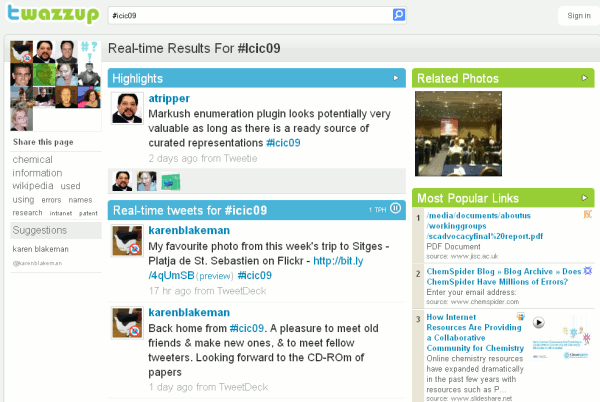
I have just returned from a conference on chemical information held in Sitges - hashtag #icic09. This should be an easy one for Bing Twitter to handle I thought. Silly me. Up came "We did not find any Twitter results or links for icic09". I tried it with and without the hashtag - still nothing.  And yet both search.twitter.com and www.twazzup.com had no problem finding tweets from the conference.

Bing Twitter results on #icic09


Twazzup results on #icic09


It also appears that you cannot search on a username. I then compared the results of searches on keywords and names that I knew had been tweeted at the conference: chemspider, chemspiderman, David Walsh, semantic mediawiki, markush. Nothing! It seems that the whole conference has been boycotted by Bing Twitter. I did begin to suspect that the service is not really up and running but searching on Nick Griffin came up with plenty of results and it found a tweet from one of my Twitter network about chickpea curry that had been posted a few minutes before.

There is something seriously wrong with Bing Twitter. Until they fix it and can present credible results I recommend that you give it a miss.

So what of Google's offering? It isn't live yet but there is useful discussion and comments on Google Social Search Is Coming & More On Google-Twitter. The main question for us as searchers is whether or not the Twitter search will be integrated into the standard web search or made available as a separate option. Tweets are already included in the web search as I discovered when I did a search on icic09 but they are spread out amongst the results. It would make sense to have a separate search tool such as Google's Blogsearch. Another option would be to incorporate it into the side bar under "Show options" (See Google new search and display options).

Bing have yet again snatched defeat from the jaws of victory. As for Google Twitter, we shall just have to wait and see.

Tuesday, 28 July 2009

University Twitter

Liz Azyan is well known for her excellent lists of local government and councils using social media but now she has turned her attention to the UK Universities. The List of UK University Twitter Accounts as of 28th July 2009 has  56 accounts so far and as well as the name of the university it includes the 'bios'. A surprising number don't have one! In addition there is a University Twitterleague according to number of followers as of 28th July 2009. If your institution is missing from the list either email Liz at research@lizazyan.com or leave your details in the comment box to the posting.


You might also want to check out the  List of UK Universities Fan Pages on Facebook as of 28th July 2009 sorted by number of fans. The top two, and way above the rest, are The Open University (16,913) and Oxford University (14,867). Again email Liz or leave a comment if your university is missing from the list.

Wednesday, 15 July 2009

Twitter Account Suspended

Just got back from #pcw09 conference - Building Perfect Council Websites - and went to check my Twitter home page only to be told that my account has been suspended!


It could be the large number of tweets that I did at the conference but then I tweeted at a higher rate at the UKeiG conference without any problems. Or perhaps certain government departments and local councils did not like my comments? Me, paranoid?!

I've posted a request to Twitter asking them why I have been suspended but it could take days or even weeks to sort out.  I already feel as though I am in solitary confinement and it means I have no contact with friends or colleagues via Twitter, which is a major communications channel for me. It looks as though it is back to email (karen.blakeman@rba.co.uk), Facebook (facebook.com/karenblakeman) and LinkedIn for communications.

Telephone? What's that?

Friday, 29 May 2009

PATLIB 2009 presentations

The presentations that I gave at PATLIB 2009 in Sofia, Bulgaria lastweek are now available at http://www.rba.co.uk/patlib2009. There are two: a 25 minute  presentation that was given as part of the main conference and the longer half day pre-conference workshop. As usual, many of the slides will probably not make sense without my commentary but you are welcome to email or Twitter DM me if you want more information.

There is also a two page "Getting started with Twitter" document. Yes, I know that there is a plethora of  how-to-twitter pages on the web but almost none of them answer the questions that I am asked on my workshops. The best and most succinct that I have found so far is the two page http://portfolio.ginaminks.com/job_aides/twitter_cheat_sheet.pdf

Friday, 24 April 2009

Twitterplan - UK local government mashup for planning applications

I discovered Twitterplan via a posting on Liz Azyan's excellent blog - Twitterplan: The Newest Mashup in UK Local Government via her Twitterstream @liz_azyan.

Twitterplan is a new service that has been set up by Lichfield District Council with help from the City of Lincoln Council and Planning Alerts. It sends a Twitter direct message to you whenever a planning application is submitted in your area. Go to http://www.twitterplan.co.uk/ and follow the instructions on screen.


The service covers 324 local authorities at present and there is a list of participants on the Twitterplan web site. My own council - Reading Borough Council - are included, which surprised me. Reading BC do not seem to be that keen to embrace Web 2.0 technologies and their web site can be a nightmare to navigate. They may be in the list, I thought, but will they actually deliver? A few hours after I had signed up my first two DMs arrived!


I am impressed: click on the link and you are taken direct to the details on the authority's web site. It beats having to carry out an advanced Google site search on the Reading BC web site and trawling through the local newspaper planning applications.

Thursday, 16 April 2009

Add tweets to your Google search results in Firefox

Greasemonkey now has a script that adds a Twitter search to your Google search results in Firefox.

First install the  Greasemonkey plugin then install "Twitter Search results on Google" script.  Run a search in Google and the script will display the 5 most recent tweets above the Google results.


Saturday, 14 February 2009

Hants & Isle of Wight Web 2.0 Session

A reminder to all of you who attended the CILIP Hampshire & Isle of Wight evening meeting on Web 2.0 and social networking that the PowerPoint can be downloaded from http://www.rba.co.uk/hiow/ . Anyone is free to download it if they wish but it probably won't make much sense unless you were there and heard my commentary! It is also available on SlideShare at http://www.slideshare.net/KarenBlakeman/cilip-hants-isle-of-wight-social-networking


You might also like to view the twitterstream that evolved over the evening by going to http://search.twitter.com/ and searching on the hashtag #hiow . You will note the participants had their  priorities right by tweeting on the quality of the biscuits and tea/coffee :-)

A big thank you to all of you around the world who tweeted to us at the seminar about where you were, what you were doing and how you use Twitter. It really showed how great Twitter can be.

Monday, 2 February 2009

Keeping up with #uksnow disruption

If  you are interested in monitoring how the snow is progressing across the UK Ben Marsh has compiled a Google-Twitter mashup to map tweets tagged with #uksnow. Twitter users have been using #uksnow for reports on the amount of snowfall and travel disruption that they encounter. If they also include the first part of their postcode and marks out of 10 for the amount of snowfall their tweet is automatically added to a Google map.  The site updates every minute.

#uksnow tweets 9.55 am 2nd February 2009

Tuesday, 18 November 2008

LARIA/ALGIS Presentation: Web 2.0 in the Public Sector

The presentation I gave at 'Managing Information in the Public Sector - The Future - Relaunching ALGIS' is now available on Slideshare at http://www.slideshare.net/KarenBlakeman/web-20-in-the-public-sector-presentation and on Authorstream at http://www.authorstream.com/Presentation/karenblakeman-109455-web-2-0-public-sector-laria-algis-uk-lariaweb2-others-misc-ppt-powerpoint/ .

The slides are based on earlier Web 2.0 presentations but I have included examples from local government authorities and public libraries. Apologies to those of you I have used as examples: you may be deluged with enquiries from the seminar participants! There was a lot of interest in what is being done especially by local authorities.

The event was a joint LARIA/ALGIS seminar and held in London at Baden Powell House, London, Tuesday 18th November 2008. All the presentations will be available on the LARIA web site.

Tuesday, 9 September 2008

50 Ideas on Using Twitter for Business

As well as being an RSS junkie I confess that I am also a member of the the 'twitterazi'. Deprived of my regular Twitter fixes I suffer severe withdrawal symptoms. What is infobunny up to? Did Jillbrad manage to print her spreadsheet? Did Tebbo meet up with anyone at T5?

Persuading people that RSS is a good thing is not that difficult, but proving the value of Twitter is hard work.  Chris Brogan's blog posting  on 50 Ideas on Using Twitter for Business is a great starting point for ideas on how you can seriously use Twitter. He also lists 'The Negatives People Will Throw at You' and 'Some Positives to Throw Back'.  My personal favourite in the list is number 11: Instead of answering the question, “What are you doing?”, answer the question, “What has your attention?"