Showing posts with label Assessing Quality. Show all posts

Tuesday, 15 November 2016

How to write totally misleading headlines for social media

Or how to seriously annoy intelligent people by telling deliberate lies.

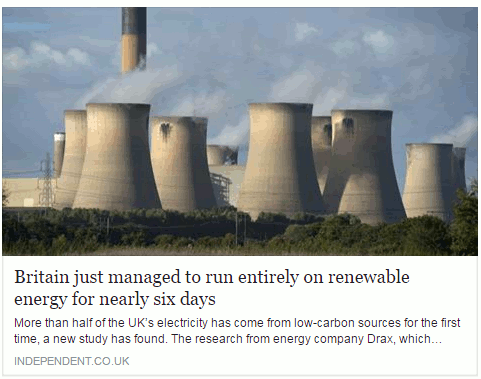
A story about renewable energy has been doing the rounds within my social media circles,  and especially on FaceBook. It is an article from The Independent newspaper that has been eagerly shared by those with an interest in the subject.  The headline reads "Britain just managed to run entirely on renewable energy for six days".

This is what it looks like on FaceBook:
britain_entriely_run_renewable_energy_1

My first thought was that, obviously, this was complete nonsense. Had all of the petrol and diesel powered cars in Britain been miraculously converted to electric and hundreds of charging points installed overnight? I think that we would have noticed, or perhaps I am living in a parallel universe where such things have not yet happened.  So I assumed that the writer of the article, or the sub-editor,  had done what some journalists are prone to do, which is to use the terms energy and electricity interchangeably. Even if they meant "electricity"  I still found the claim that all of our electricity had been generated from renewable sources for six days difficult to believe.

Look below the  headline and you will see that the first sentence says "More than half of the UK’s electricity has come from low-carbon sources for the first time, a new study has found." That is more like it. Rather than "run entirely on renewable energy" we now have "half of the UK's electricity has come from low-carbon sources" [my emphasis in both quotes]. But why does the title make the claim when straightaway the text tells a different story? And low carbon sources are not necessarily renewable, for example nuclear. As I keep telling people on my workshops, always click through to the original article and read it before you start sharing with your friends.

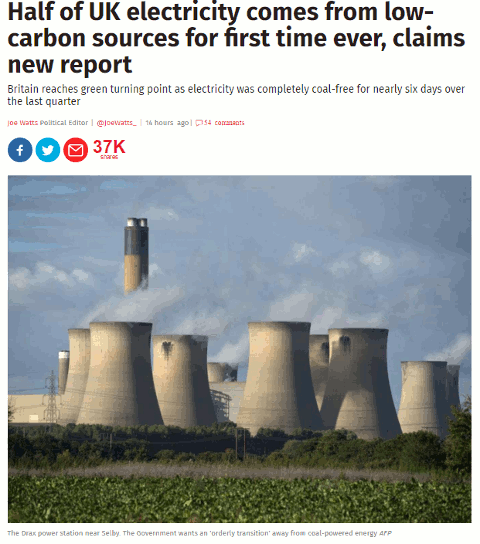
The title on the source article is very different from the facebook version as is the subtitle.
britain_entriely_run_renewable_energy_2
We now have the title "Half of UK electricity comes from low-carbon sources for first time ever, claims new report", which is possibly more accurate. Note that "renewable" has gone and we have "low carbon sources" instead. Also, the subtitle muddies the waters further by referring to "coal- free".

If you read the article in full it tells you that "electricity from low-emission sources had peaked at 50.2 per cent between July and September" and that happened for nearly six days during the quarter.  So we have half of electricity being generated by "low emission sources" but, again, that does not necessarily equate to renewables. The article does go on to say that the low emission sources included UK nuclear (26 per cent) , imported French nuclear,  biomass, hydro, wind and solar.  Nuclear may be low emission or low carbon but it is not a renewable.

Many of the other newspapers are regurgitating almost identical content that has all the hallmarks of a press release. As usual, hardly any of them give a link to the original report but most do say it is a collaboration between Drax and Imperial College London. If you want to see more details or the full report then you have to head off to your favourite search engine to hunt it down.  It can be found on the Drax Electric Insights webpage. Chunks of the report can be read online (click on Read Reports near the bottom of the homepage) or you can download the whole thing as a PDF. There is also an option on the Electric Insights homepage that enables you to explore the data in more detail.

This just leaves the question as to where the FaceBook version of the headline came from.  I suspected that a separate and very different headline had been specifically written for social media. I tested it by copying the URL and headline of the original article using a Chrome extension and pasted it into FaceBook. Sure enough, the headline automatically changed to the misleading title.

To see exactly what is going on and how, you need to look at the source code of the original article:

britain_entriely_run_renewable_energy_3

Buried in the meta data of page and tagged "og:title" is the headline that is displayed on FaceBook. This is the only place where it appears in the code.  The "og:title" is one of the open graph meta tags that tell FaceBook and other social media platforms what to display when someone shares the content. Thus you can have totally different "headlines" for the web and FaceBook that say completely different things.

Compare "Britain just managed to run entirely on renewable energy for six days" with "Half of UK electricity comes from low-carbon sources for first time ever, claims new report" and you have to admit that the former is more likely to get shared. That is how misinformation spreads. Always, always read articles in full before sharing and, if possible, try and find the original data or report. It is not always easy but we should all have learnt by now that we cannot trust politicians, corporates or the media to give us the facts and tell the full story.

Update: The original press release from DRAX "More than 50% of Britain’s electricity now low carbon according to ground-breaking new report"

Thursday, 2 June 2016

Searching for the height of Ben Nevis - how hard can it be?

If you have attended one of my recent search workshops, or glanced through the slides, you will have noticed that I have a new test query: the height of Ben Nevis. It didn't start out as a test search but as a genuine query from me.  A straightforward search, I thought, even for Google.

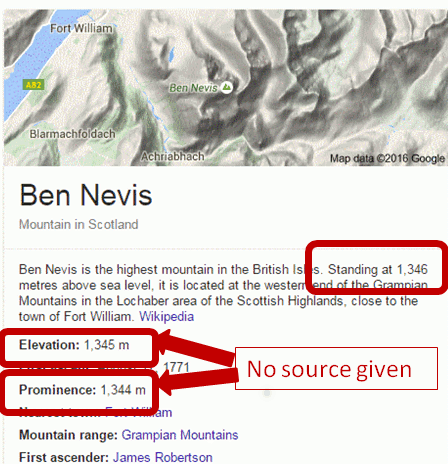
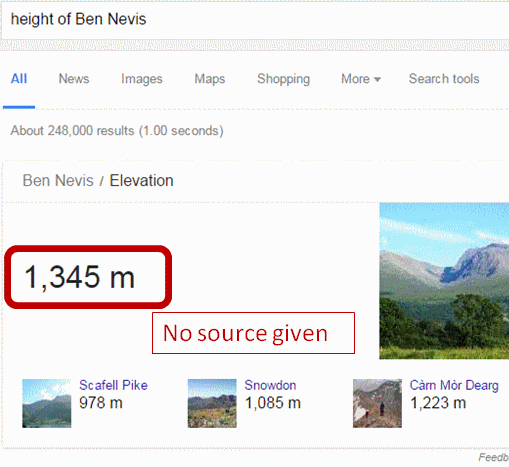
I typed in the query 'height of ben nevis' and across the top of the screen Google emblazoned the answer: 1345 metres.  That sort of rang a bell and sounded about right, but as with many of Google's Quick Answers there was no source and I do like to double or even triple check anything that Google comes up with.

Ben_Nevis_1

To the right of the screen was a Google Knowledge Graph with an extract from Wikipedia telling me that Ben Nevis stands at not 1345 but 1346 metres above sea level. Additional information below that says the mountain has an elevation of 1345 metres and a prominence of 1344 metres (no sources given). I know have three different heights - and what is 'prominence'?

Ben-Nevis-3

After a little more research I discovered that prominence is not the same as elevation, but I shall leave  you to investigate that for yourselves if you are interested. The main issue for me was that Google was giving me at least three slightly different answers for the height of Ben Nevis, so it was time to read some of the results in full.

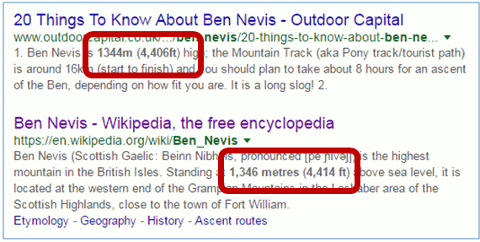
Before I got around to clicking on the first of the two articles at the top of the results, alarm bells started ringing.  One of the metres to feet conversions in the snippets did not look right.

Height of Ben Nevis search results 3

So I ran my own conversions for both sets of metres to feet and in the other direction (feet to metres):

1344m = 4409.499ft, rounded down to 4409ft

4406ft = 1342.949m, rounded up to 1343m

1346m = 4416.01ft, rounded down to 4416ft

4414ft = 1345.387m, rounded down to 1345m

As if finding three different heights was not bad enough, it seems that the contributors to the top two articles are incapable of carry out simple ft/m conversions, but I suspect that  a rounding up and rounding down of the figures before the calculations were carried out is the cause of the discrepancies.

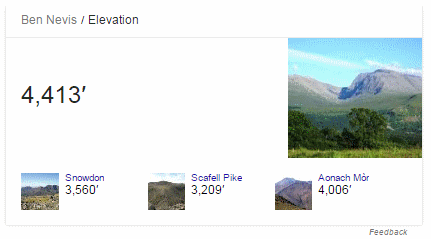
The above results came from a search on Google.co.uk. Google.com gave me similar results but with a Quick Answer in feet, not metres.

Ben-Nevis-4

We still do not have a reliable answer regarding the height of Ben Nevis.

Three articles below the top two results were from BBC News, The Guardian and Ordnance Survey - the most relevant and authoritative for this query -  and were about the height of Ben Nevis having been remeasured earlier this year using GPS. The height on the existing Ordnance Survey maps had been given as 1344m but the more accurate GPS measurements came out at 1344.527m or 4411ft 2in. The original Ordnance Survey article explains that this is only a few centimetres different from the earlier 1949 assessment but it means that the final number has had to be rounded up rather than down. The official height on OS maps has therefore been increased from 1344m to 1345m.  So Google's Quick Answer at the top of the results page was indeed correct.

Why make a fuss about what are, after all, relatively small variations in the figures? Because there is one official height for the mountain and one of the three figures that Google was giving me (1346m) was neither the current nor the previous height. Looking at the commentary behind the Wikipedia article, which gave 1346m, it seems that the contributors were trying to reconcile the height in metres with the height in feet but carrying out the conversion using rounded up or rounded down figures. As one of my science teachers taught me long ago, you should always carry forward to the next stage of your calculations as many figures after the decimal point as possible. Only when you get to the end do you round up or down, if it is appropriate to do so. And imagine if your Pub Quiz team lost the local championship because you had correctly answered 1345m  to this question but the MC  had 1346m down as the correct figure? There'd be a riot if not all out war!

That's what Google gave us. How did Bing fare?

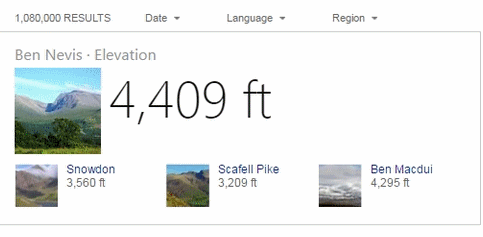
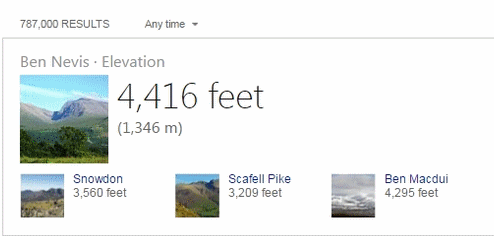
The US and UK versions of Bing gave results that looked very similar to Google's but  with two different quick answers in feet, and neither gave sources:

Bing UK

Ben-Nevis-Bing-UK

Bing US

Bing-Ben-Nevis-US

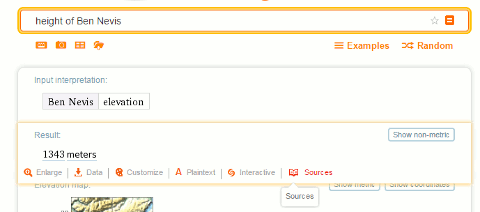
I won't bore you with all of the other search tools that I tried except for Wolfram Alpha. This gave me 1343 meters or 4406 ft. At least the conversion is correct but there is no direct information on where the data has been taken from.

Ben-Nevis-WA

The sources link was of no help whatsoever and referred me to the home pages of the sites and not the Ben Nevis specific data. On some of the sites, when I did find the Ben Nevis pages, the figures were different from those shown by Wolfram Alpha so I have no idea how Wolfram arrived at 1343 meters.

So, the answer to my question "How high is Ben Nevis?" is 1344.527m rounded up on OS maps to 1345m.

And the main lessons from this exercise are:

  1. Never trust the quick answers or knowledge graphs from any of the search engines, especially if no source is given. But you knew that anyway, didn't you?

  2. If you are seeing even small variations in the figures, and there are calculations or conversions involved, double check them yourself.

  3. Don't skim read the results and use information highlighted in the snippets - read the full articles and from more than one source.

  4. Make sure that the articles you use are not just copying what others have said.

  5. Try and find the most relevant and authoritative source for your query, and ideally a primary source. In this case it was Ordnance Survey. GB officially taller - Ben Nevis  https://www.ordnancesurvey.co.uk/about/news/2016/gb-officially-taller-ben-nevis.html

Wednesday, 30 March 2016

Debunking Euromyths

Those of us living in the UK have become accustomed to sensational headlines in the British press warning us that the European Union (EU) is about to ban British cucumbers, sausages, cheese, church bells, street acrobats [insert food or activity of your choice]. Tracking down the relevant EU legislation to find out whether or not there is any truth in the stories is a nightmare, and they are not the easiest of documents to read and understand when you do find them. But help is at hand from an EU blog called "European Commission in the UK – Euromyths and Letters to the Editor" at http://blogs.ec.europa.eu/ECintheUK/.

The blog covers scare stories that have appeared in the UK press, some of which go back to 1992, and explains what the situation really is and the relevant legislation.

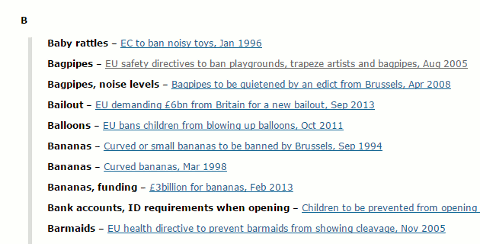
Euromyths A-Z

There is a neat A-Z index at   http://blogs.ec.europa.eu/ECintheUK/euromyths-a-z-index/ so you can quickly check, for example, if the EU is about to ban bagpipes:

"As for banning bagpipes, Scots can rest assured that their favourite musical instrument is not under threat from EU proposals on noise pollution ... they are designed primarily for those who work with loud machinery for a sustained period – more than 87 decibels for eight hours in a row. The law ... will apply only to workers rather than audiences.  If, in the highly unlikely event a bagpipe player is hired to play continuously for eight hours, and the noise created averaged more than 87 decibels, the employer would be obliged to carry out a risk assessment to see where changes can be made – tinkering with the acoustics in a hall to reduce echoes, for example. If that fails, personal protection such as earmuffs will need to be considered, but only as a last resort. Banning musical instruments is not an option. "


The blog is just one of many on the Europa website. A list can be found at Blogs of the European Commission.

Monday, 2 March 2015

And you thought Google couldn't get any worse

We've all come across examples of how Google can get things wrong: incorrect supermarket opening hours (http://www.rba.co.uk/wordpress/2015/01/02/google-gets-it-wrong-again/), false information and dubious sources used in Quick Answers (http://www.rba.co.uk/wordpress/2014/12/08/the-quality-of-googles-results-is-becoming-more-strained/), authors who die 400 years before they are born (http://googlesystem.blogspot.co.uk/2013/11/google-knowledge-graph-gets-confused.html), a photo of the actress Jane Seymour ending up in a carousel of Henry VIII's wives (http://www.slate.com/blogs/future_tense/2013/09/23/google_henry_viii_wives_jane_seymour_reveals_search_engine_s_blind_spots.html) and many more. What is concerning is that in many cases no source is given. According to Search Engine Land (http://searchengineland.com/google-shows-source-credit-quick-answers-knowledge-graph-203293) Google doesn't provide a source link when the information is basic factual data and can be found in many places. But what if the basic factual data is wrong? It is worrying enough that incorrect or poor quality information is being presented in the Quick Answers at the top of our results and in the Knowledge Graph to the right, but the rot could spread to the main results.

An article in New Scientist (http://www.newscientist.com/article/mg22530102.600-google-wants-to-rank-websites-based-on-facts-not-links.html) suggests that Google may be looking at significantly changing the way in which it ranks websites by counting the number of false facts in a source and ranking by "truthfulness". The article cites a paper by Google employees that has appeared in arXiv (http://arxiv.org/abs/1502.03519) "Knowledge-Based Trust: Estimating the Trustworthiness of Web Sources". It is heavy going so you may prefer to stick with just abstract:

"The quality of web sources has been traditionally evaluated using exogenous signals such as the hyperlink structure of the graph. We propose a new approach that relies on endogenous signals, namely, the correctness of factual information provided by the source. A source that has few false facts is considered to be trustworthy. The facts are automatically extracted from each source by information extraction methods commonly used to construct knowledge bases. We propose a way to distinguish errors made in the extraction process from factual errors in the web source per se, by using joint inference in a novel multi-layer probabilistic model. We call the trustworthiness score we computed Knowledge-Based Trust (KBT). On synthetic data, we show that our method can reliably compute the true trustworthiness levels of the sources. We then apply it to a database of 2.8B facts extracted from the web, and thereby estimate the trustworthiness of 119M webpages. Manual evaluation of a subset of the results confirms the effectiveness of the method."

If this is implemented in some way, and based on Google's track record so far, I dread to think how much more time we shall have to spend on assessing each and every source that appears in our results. It implies that if enough people repeat something on the web it will deemed to be true and trustworthy, and that pages containing contradictory information may fall down in the rankings. The former is of concern because it is so easy to spread and duplicate mis-information throughout the web and social media. The latter is of concern because a good scientific review on a topic will present all points of view and inevitably contain multiple examples of contradictory information. How will Google allow for that?

It will all end in tears - ours, not Google's.

Friday, 2 January 2015

Google gets it wrong again

Yesterday, on New Year's Day, I came across yet another example of Google getting its Knowledge Graph wrong. I wanted to double check which local shops were open and the first one on the list was Waitrose. I vaguely recalled seeing somewhere that the supermarket would be closed on January 1st but a Google search on waitrose opening hours caversham suggested otherwise. Google told me in its Knowledge Graph to the right of the search results that Waitrose was in fact open.


Knowing that Google often gets things wrong in its Quick Answers and Knowledge Graph I checked the Waitrose website. Sure enough, it said "Thursday 01 Jan: CLOSED".


If you look at the above screenshot of the opening times you will see that there are two tabs: Standard and Seasonal. Google obviously used the Standard tab for its Knowledge Graph.

I was at home working from my laptop but had I been out and about I would have used my mobile, so I checked what that would have shown me. Taking up nearly all of the  screen was a map showing the supermarket's location and the times 8:00 am - 9:00 pm. I had to scroll down to see the link to the Waitrose site so I might have been tempted to rely on what Google told me on the first screen. But I know better. Never trust Google's Quick Answers or Knowledge Graph.

Sunday, 27 June 2010

iPhone 4 to be recalled: it's true - the Daily Mail says so

The Daily Mail has done it again and proved that the quality of their research is second to none, because they don't do any. They have an exclusive on the possible product recall of the iPhone 4. You can see the article on the Daily Mail site at http://www.dailymail.co.uk/sciencetech/article-1289965/Apple-iPhone-4-recalled-says-Steve-Jobs.html, or possibly not. By the time you read this posting the Daily Mail might have realised that they have made complete idiots of themselves and removed the story. So here is a screen shot of the headline:


The source of the story? The man himself: Apple CEO Steve Jobs announced the possible recall last night via his Twitter account @ceoSteveJobs. There's just one teensy weensy problem. The 'bio' for @ceoSteveJobs clearly states:

"I don't care what you think of me. You care what I think of you. Of course this is a parody account."

Perhaps the Daily Mail does not understand what parody is? Or maybe the ability to read is no longer a requirement for Daily Mail journalists?

Checking the authority and veracity of a source is an important part of research as those of us who do this for a living well know. It can be a time consuming and long-winded process but in this case it was clearly stated on the Twitter account that the source was A PARODY ACCOUNT. How difficult is it to read the profile on this account?


No doubt the Daily Mail will now regale us with tales of how Twitter is riddled with liars, fakes and false information and that it should be immediately banned from these shores.

Time to sing along to that popular ditty "The Daily Mail Song" by Dan and Dan http://www.youtube.com/watch?v=5eBT6OSr1TI

And as I finish writing this I see that the Daily Mail have pulled the story from their web site. If you are desperate to see a copy of the original I have one here. It will feature in my workshops on assessing the quality of information!

Monday, 6 November 2006

Assessing the Quality of Information: Top Tips

Or: Paranoia 'r' us

This is a list of Top 10 Tips that the participants of Assessing the Quality of Information compiled at the end of a workshop held at TFPL in London on 31st October 2006. On a scale of 1 to 10, most of the delegates started out with a paranoia level of around 7 or 8. By the time they had worked through half the exercises a couple of them had increased that to 25-30! Paranoia had eased off slightly by the end of the day and at least they had a toolkit at their finger tips that they could use to help evaluate and assess the quality and validity of information.

  1. Check who is behind the domain name of a web site using www.allwhois.com . The contact details sometimes just give the ISP or service who organised the domain name for the web site owner but at least it is a starting point if you need to contact the owner to discuss any issues about the content. If someone really wishes to hide, they can use an agent to do the registration for them and in that case there is little one can do to track down the real owner. Note that you can only find out who owns a domain name; you cannot take a person’s or company’s name and find out which domain names they own.

  2. Try the Wayback Machine (Internet Archive) (www.archive.org) for tracking down pages or sites that have disappeared. Type in the web site URL or the URL of the document/page you have ‘lost’. This can pick up pages no longer cached by the search engines (see number 3 below). This trick is not guaranteed: some sites have asked to be removed from the archive or have designed their pages so that they automatically refresh to the most recent page. This can also be a useful tool for reviewing how a company presented itself on the web in the past and how organisations have evolved, both of which can be useful components of assessing quality.

  3. Look at the search engine cached copies of pages for more recent past pages. This is especially useful if the current web page that you found via Google et al does not seem to resemble your search strategy in any way. The cached copy is the copy that the search engine has in its index and it will also highlight your search terms within the page.

  4. Use links to and from the site or page to find pages that are similar to a known quality page (pages of similar content tend to link to one another), or to see what other people saying about the page in terms of quality and the authority and of those that link to it. Use Windows Live (www.live.com) . For pages that link in to your known or ‘suspect’ page use the link and linkdomain commands.Link will find pages that link to an individual page, for example: link:www.rba.co.uk/sources/stats.htm

    Linkdomain will find pages that link to anywhere within a web site, for example:
    linkdomain:rba.co.uk

    To find out what page a site links to (can give you an idea of bias, political stance, ideology etc) use linkfromdomain, for example: linkfromdomain:rba.co.uk

  5. Use ‘hoaxbusting’ sites for if you are suspicious about a site or a ‘well known and accepted fact’. Examples are:
    www.snopes.com
    hoaxbusters.ciac.org
    www.vmyths.com (concentrates on virus myths and hoaxes)
    www.regrettheerror.com

  6. If relevant and appropriate double check information and data with other independent sources (not always possible and you may find yourself going round on circles chasing sources that quote each other!)

  7. Use the search engine advanced options to focus your search. For example the domain and site command or box to limit your search to, for example, UK government sites (gov.uk), academic sites (.ac.uk, .edu etc), a known trusted site.

  8. Use different search tools and their features to give you results that are prioritised in a different order or for suggestions on alternative search strategies:
    Yahoosearch.yahoo.co.uk – for results sorted in a different order from Google
    AltheWeb LivesearchLivesearch.alltheweb.com – for results that change as you type and suggestions for alternative search terms
    Askwww.ask.co.uk - for ways of narrowing down or broadening your search
    Exaleadwww.exalead.com - for its unique advanced search commands and related terms
    Windows Livewww.live.com – for its link, linkdomain and linkfromdomain commandsThink about using different types of resources for example reference sources, video/audio, blogs and RSS feeds (yes, there are some good ones around!). Have a look at Trovando (www.trovando.it ) for some starting points. And don’t forget evaluated listing such as Intute (www.intute.ac.uk) and, for business, Alacrawiki (www.alacrawiki.com ).

  9. If you are looking for up date to market research etc. use market research content aggregators to identify who is publishing on a topic and go direct to the publisher. Individual publishers do not always give their full catalogue to the aggregators, may embargo their information for weeks or months, and may have more up to date information on their web site. You can also sometimes get a better deal by going direct to the publisher.

  10. Dates. Compared with structured databases, proper and accurate date searching is almost impossible with Google et al. A web page is assigned a date by the web server when it is loaded or reloaded onto the web site. It is not when the information was gathered or written. The web server date is the one that the search engines look at when you use the date option in the advanced search. Neither should you automatically trust the date that so often appears at the bottom of a page. It may be accurate and reflect the date of the content, but pages can be set-up to incorporate the date the page was loaded or reloaded onto the site, the date when minor changes are made, or even today’s date :-( If the date is not obvious from the content, contact the author.


Two additional general points were made in conclusion:

  • it is important to build up your own personal collection of sites, relevant to your sector and applications, and that you have already quality assessed and trust

  • errors and misleading information are not new and pre-date the Internet era. Nothing has changed in that mistakes and bias in the media - whatever form - are a fact of life. What has changed is that everyone now has the opportunity to become involved in creating and perpetuating myths and mis-information, which means that we have to wade through so much more rubbish and spend more time separating the gold from the dross.

Monday, 28 August 2006

Intute - the best Web resources for education and research

A reminder that the Resource Discovery Network (RDN) has been replaced by Intute.

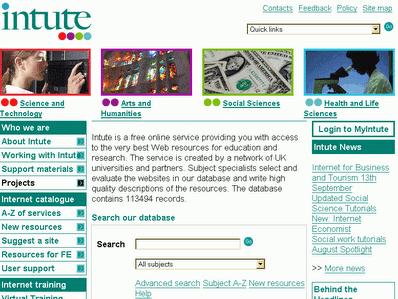
"Intute is a free online service providing you with access to the very best Web resources for education and research. The service is created by a network of UK universities and partners. Subject specialists select and evaluate the websites in our database and write high quality descriptions of the resources."

I find the new service much easier to navigate and I can find relevant gateways much more quickly than with the old RDN. There are 4 main areas: Science & Technology; Arts & Humanities; Social Sciences; and Health & Life Sciences. If you are intrested in business information, the resources covered by the busines and management section of SOSIG are now at http://www.intute.ac.uk/socialsciences/business/. Although their target audience is students, staff and researchers in higher and further education this collection of resources is of value to anyone who uses business information.

Monday, 26 June 2006

The Internet Detective is back


The Internet Detective is back on the case after a year's vacation. Internet Detective was originally developed in 1998 with funding from the European Union but was withdrawn in 2005. The free online tutorial is designed to help students develop the critical thinking required for their Internet research and is now in the Intute (formerly the RDN) Virtual Training Suite at http://www.vts.intute.ac.uk/detective/
Although aimed at students the tutorial is of value to anyone who uses the Internet for research. It highlights why information quality is an issue on the Internet, offers hints and tips on evaluating information, and how to recognise scams and hoaxes. The tutorial and associated exercises take about an hour to complete, although I would expect experienced researchers to be able to do it in less than that and get all the answers right! You can skip sections if you wish and you do not have to complete it in one sitting.
If nothing else, it serves as a reminder to all of us on how to differentiate between the the Good, the Bad and the Ugly on the Net.